As you know, Google is flooded with millions of websites, businesses, and information designed to satisfy user intent, but users only click on a few of them. The key is GMB in Pune, which stands for Google My Business, one of the amazing methods in local SEO.
When users search for any local business in Pune, whether it's a website, product, or service related to your niche, Google displays your business at the top. This increases the chances of clicks and impressions on your website, helping you reach nearby customers more effectively.
According to research data, a user's local search has a 70% chance of leading to action. This proves that GMB is not just an option, but a necessity for your business if you want to stand out in Pune and even expand to other cities. While GMB may seem easy to set up, GMB optimisation is a highly attentive task, and it plays a crucial role in building authority and trust with your audience.
In this blog, you will understand the role of the GMB profile and tips that will help you verify your business and enhance your listing so it truly stands out. With the right guide and expert Google Maps SEO strategies, your business can rank higher in local search results and attract more customers from the Pune area.
Key Takeaways
- Benefits of Google My Business (GMB)
- Enhanced Customer Engagement With Your Company
- Understand Your Customers with GMB Insights
- Free Marketing for Pune Business
- Easy Mobile Access for Pune Customers
What is Google My Business?
Google My Business, also known as Google Business Profile, is a free tool that helps your business show up on Google Search and Google Maps. To follow this, you must adhere to the NAP formula, which involves adding essential details about the company, such as the business name, address, working hours, and contact number. You can connect with and respond to customer feedback, add photos, and learn more about how people discover and engage with your business online.
Don’t get confused between Google My Business and Google Business Profile; both are the same, just different names. They are actually the same tool; Google just gave it a new name. Although the official name is now Google Business Profile, you will still refer to it as Google My Business, as many people are still familiar with it by that name.
It's important to know the difference between the map pack and organic results.
- The map pack is the top section of your Google Search results, showing maps for the top three local business listings when you search for services near you.
- Organic results are the regular website links that appear below the map.
When you set up and update your Google Business Profile Pune, your business is more likely to appear in the map pack, which means more local people can find you easily.
Why Google My Business Optimisation Matters in Pune
Suppose you run a business in Pune, especially in busy areas like Baner, Hinjewadi, Kothrud, or Viman Nagar. Then you must know about the level of competition and understand how to cater to this. Many companies offer similar services, so standing out online is not easy. Here, Google My Business optimization in Pune becomes a powerful tool.
Today, many business owners are using local SEO keywords like “near me” or “in Pune” when searching for products or services. Whether it’s “restaurant near me,” “plumber in Kothrud,” or “gym in Hinjewadi,” these local intent searches are very common, especially on smartphones.
Most of these searches happen on mobile devices, and GMB listings appear at the top of Google Search and Google Maps. This makes it simple for potential customers to call, visit, or learn more with just one click. By focusing on GMB optimisation for Pune-based companies, you improve your chances of showing up in the local 3-pack, increasing your visibility where it matters most.
In a fast-growing city like Pune, Google Business Profile optimisation is an essential tool for attracting more local customers and staying ahead of your local competitors.
Learn More about google my business optimization checklist
Explore 5 Google My Business Tips for Pune-Based Companies
As a business owner, you have seen how useful Google My Business (GMB) is for getting noticed online and reaching more local customers. It helped me get more clients by showing all my important business details in one easy-to-find place.
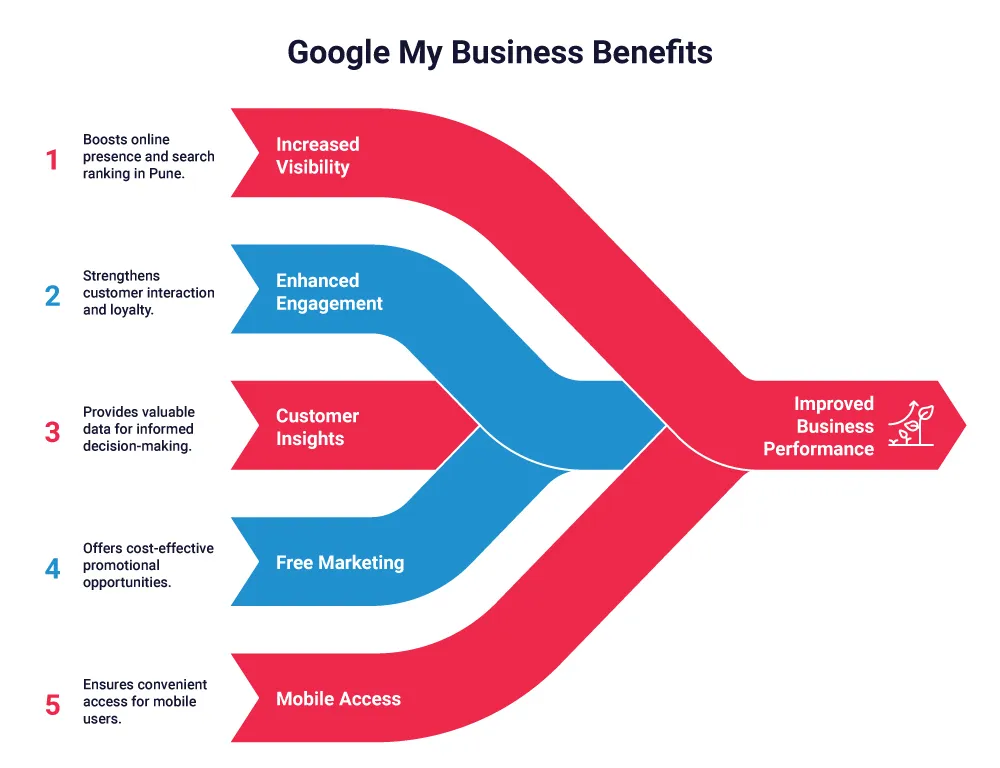
Benefits of Google My Business (GMB)
1. Increased Visibility and Rank in Pune
Most of the people in Pune use Google to find local businesses for products and services. In fact, almost half of all Google searches are local, and 97% of people search online to find nearby stores or services. In 2024, about 30% of those searches were about to make a purchase. If you set up your Google My Business (GMB) profile, your business can appear in top search results and on Google Maps, especially when someone types things like “salon near me” or “veg restaurant in Pune.” This helps to attract local people to find and contact you.
Tips: Add your area name in the business title or description. For example, instead of just “City Pizza,” use “City Pizza – Viman Nagar.”
2. Enhanced Customer Engagement With Your Company
One of the best things about Google My Business is that it helps you connect directly with your customers. You can answer questions and reviews, which shows that you care about your customers’ experience.
Research shows that 75% of people trust online reviews, so it’s important to reply to both good and bad ones. This builds trust and encourages people in Pune to leave reviews and interact with your business.
Tip for Pune Businesses: Always say thank you for positive reviews and try to solve problems in negative ones. It shows that your business is active and cares about its customers.
3. Understand Your Customers with GMB Insights
One of the best features of Google My Business is that it shows you how people find and interact with your business. You can see:
- What search terms people use
- Where are they located in Pune?
- What actions customers take, like they can calling you or visiting your website
This information helps you know what’s working and where you can improve.
Tips: Check your GMB feedback weekly. Use the data to improve your posts, services, or offers based on what locals are really searching for.
4. Free Marketing for Pune Business
Google My Business gives you free exposure online:
- Add Photos of your products or services
- Add detailed descriptions about the business
- Update about special offers and changes
All of this helps people see what your business is about without spending money on ads. The complete and active your profile is, the more likely your business will appear in local search results on Google and Maps.
Tips: Keep updating your profile with fresh photos, offers, or posts. It shows your business is active and increases your chances of showing up when people search in your area.
5. Easy Mobile Access for Pune Customers
Today, most people in Pune search for businesses on their mobile phones. The good news is that Google My Business listings work perfectly on mobile. People can quickly find your business, read reviews, check hours, and get directions, all in one place.
It makes it super easy for customers who are out and about in Pune to find and visit your store or service.
Tips: Make sure your address, phone number, and hours are always correct on your GMB profile. It helps clients reach you with just one click.
Guide to Set Up a Google My Business
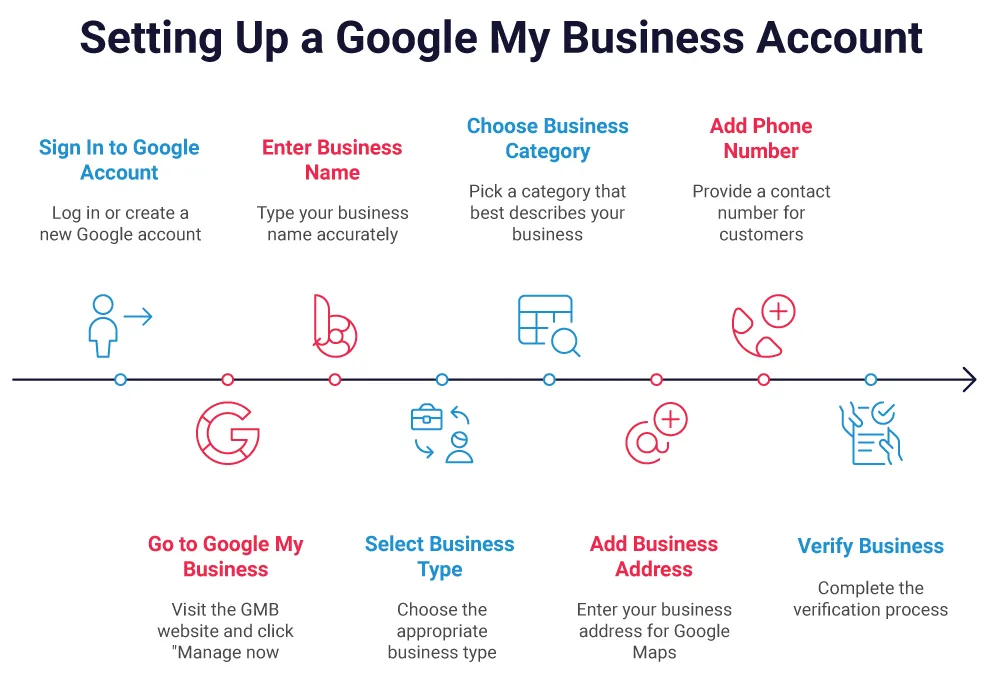
GMB helps you users to find your business easily on Google Search and Google Maps. Here is a simple guide to help you create your GMB Account:
Step 1: Sign In to Your Google Account
- Log in to your Google Account if you want to link to your business.
- If you don’t have one, you’ll need to create a new Google account first.
Step 2: Go to Google My Business
Visit the GMB website and click “Manage now” to start.
Step 3: Enter Your Business Name
Type your business name exactly how you want it to appear in search results. Make sure it’s spelled correctly and clearly reflects your brand.
Step 4: Select Your Business Type
Choose what type of business you run:
- Online retail: for selling products online
- Local store: for physical shop locations
- Service business: for businesses that visit customers (like electricians, cleaners, etc.)
Step 5: Choose the Right Category
Pick a business category that best describes what you do.
Pro Tip: Google provides you 10 categories in which you can add your business (1 main + 9 sub-categories). Use them appropriately to show the full range of your services.
Step 6: Add Your Business Address
Enter your right business address so that users can find you easily on Google Maps. It is important for local customers.
Step 7: Add Your Phone Number
You can add your contact number so customers can call you directly. You can skip this if you are not ready to do it for now.
Step 8: Verify Your Business
Before you go live, Google verifies your business account and ownership. You can do this by:
- Receiving a postcard by mail
- Getting a phone call
- Getting an email (if available)
If you are not ready yet? Then you can choose the “Verify Later” button and come back when you are set.
Common Mistakes to Avoid in Google My Business for Pune
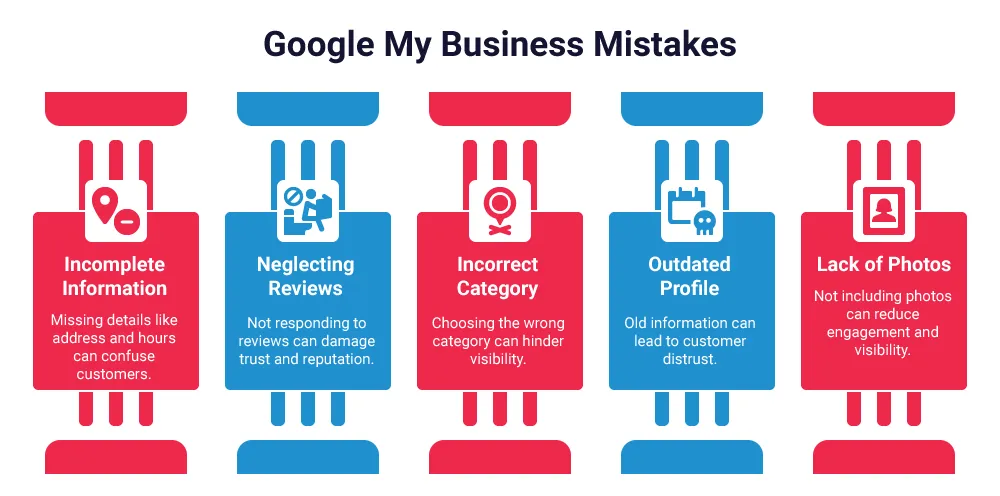
- Incomplete Business Information
Always add your full business address in Pune, phone number, and opening hours. Missing details can confuse customers and hurt your local SEO.
-
Not Replying to Reviews
Reply to your Google My Business reviews. Thank happy customers and politely fix problems from unhappy ones. This builds trust with Pune customers.
-
Wrong Business Category
Choose the right Google My Business category so people searching in Pune can find your business easily.
-
Not Updating Your GMB Profile
Keep your profile up to date with new hours, services, or offers. Old information can make customers lose trust and lower your local search ranking.
-
No Photos
Add relevant photos of your Pune shop, products, or team. Photos help your Google Maps listing get more attention.
-
Multiple Listings for One Business
Don’t create more than one listing for your Pune business. One listing helps Google show your business better in local searches.
Fix these common mistakes to get more local customers and improve your Google My Business ranking in Pune.
Conclusion: Take Charge of Your Local SEO Strategy
Google My Business is one of the best free tools to help your business in Pune get found online. Whether you run a salon, cafe, store, restaurant or service business, a GMB profile can help people nearby find and contact you easily. When you keep your profile updated with correct information, photos, and posts, you build trust and improve your chances of showing up in local search results. It doesn’t take much time, but it can bring you more customers and help your business grow.
So if you haven’t already, set up your GMB or are new to it, then you can hire W3era, the local SEO company in Pune, that will help boost your business's online visibility and guide you for local growth in Pune. The expert will understand your goal and the business and provide you customised strategy as per the needs of the business in the local area in Pune.
People Also Read
Local SEO With A GMB Audit Tool
Local SEO Services Can Drive More Traffic To Your Business