"Search Google or type a URL" is the placeholder text that appears in Google Chrome's address bar — called the Omnibox — when it is empty. It means you can either type a search term (Chrome searches Google for it) or type a website address like www.w3era.com (Chrome takes you directly there). Chrome's Omnibox combines the search bar and address bar into one single field.
More than 99000 searches are happening every second on Google. This indicates that people believe Google is the way to unlock the vast ocean of data present online. And to ensure a seamless search experience for its users, Google has come up with its tool named “Search Google or type a URL”. The tool is made to simplify and expedite finding information online.
This upgrade to the search engine page has introduced a new web search method. Users now have the option to search for things on the internet by either typing a URL or doing a regular search on Google.
In this blog, you will discover which tool is better for you among the “Google Search or Type a URL”.
Key Takeaways
- One bar, two functions — Chrome's Omnibox acts as both a search engine and an address bar. "Search Google or type a URL" is simply telling you what you can do with it.
- Type a URL when you know where you're going — it's faster, skips Google entirely, and reduces tracking.
- Search Google when you're exploring — ideal when you don't know the exact address or want to compare multiple sources.
- For sensitive sites, always type the URL directly — searching for your bank or email provider risks clicking a phishing ad disguised as the real site.
- The Omnibox does far more than most people realise — instant calculations, weather, site-specific search, and browser shortcuts are all built in.
“Search Google or type a URL” is a common phrase we often hear when referring to the two main ways of accessing websites online. The first method uses a Google search engine to find specific information or websites. Users simply enter relevant keywords or phrases, and the search engine lists matching websites.
The second method involves directly entering the website’s URL or web address into the address bar of a web browser. By doing so, users can access the website directly without relying on a search engine. These two methods serve as the primary means of navigating the vast expanse of information available on the internet. This convenient feature is available on all major web browsers, including Google Chrome, Mozilla Firefox, Microsoft Edge, and Safari.
Want your website to show up when people search on Google?
With our SEO services, we make sure your business appears where your customers are searching.
How Users Navigate the Web in 2025 (With Stats)
In 2025, the way people use the internet will have changed a lot. People don’t just sit at desktops and type anymore. Now, they use phones, smart speakers, and even smartwatches to go online. Voice search, visual search, and personal suggestions are now part of daily life.
Most users want quick answers and easy browsing. That’s why tools like “Search Google or Type a URL” are more useful than ever; they help people search the way they think.
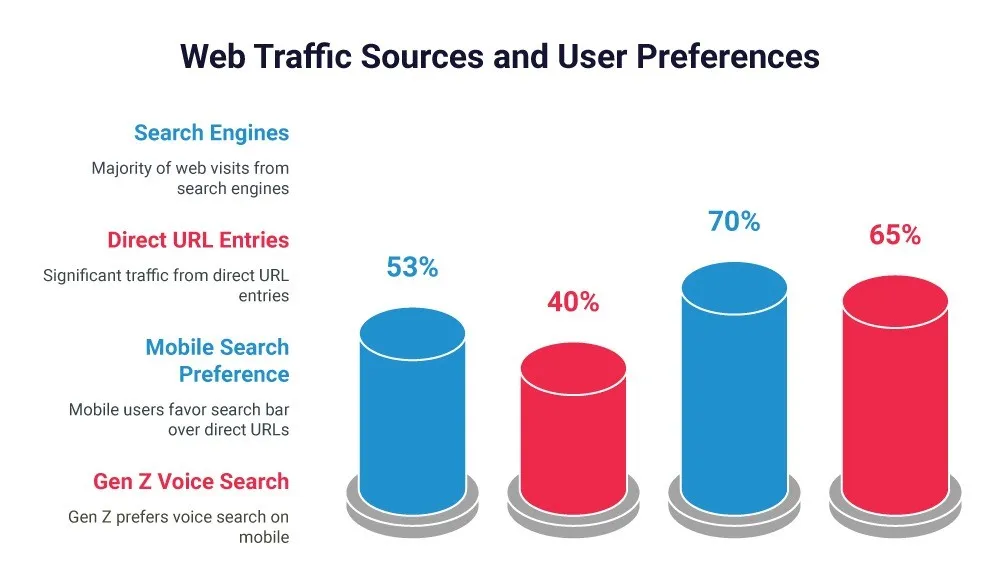
Today, the internet is everywhere. According to fresh stats 2024 of StatCounter, search engines generate about 53% of all website traffic, with 40% from direct URL submissions. People search while walking, cooking, or even driving. The internet gives results fast, often before the question is finished. Whether it's finding directions, shopping, or checking the news, users want simple, fast, and helpful results. Everything is now designed to save time and make life easier. Search tools don’t just answer questions; they help with daily tasks, too.
Interesting Fact: According to a Pew Research study, 65% of Gen Z users find it easier to use voice search on their phones compared to typing.
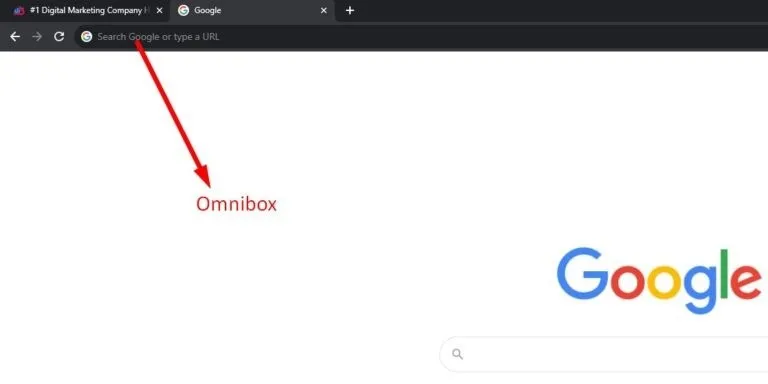
The Omnibox feature is a convenient tool that allows users to search Google or enter a URL directly to find information online. It is also called “Google search or type web address”. This feature is helpful for those unfamiliar with using Google search, as it simplifies the process.
With the Omnibox, users can not only search the web but also perform mathematical calculations, unit conversions, and other functions. It is a time-saving feature when searching for information or navigating specific websites.
When using the Omnibox, users will see default suggestions like “Google search or type web address” in their browser’s address bar. Although some devices may display slightly different text, such as “search or type web address”, the function remains the same. It offers an efficient way to access the web with just a few keystrokes.
Omnibox in 2025: More Than Just a Search Bar
The Omnibox in 2025 is more than just a place to type web addresses. It’s a smart tool that helps you search, browse, and manage your browser faster.
Here’s what it can do:
- Smart Autocomplete: Start typing, and it finishes the website for you.
- Quick Actions: Type “clear history” or “delete cookies” to open settings instantly.
- Open Apps: Just type “YouTube” or “Gmail” to go there right away.
- Voice Search: Tap the mic and speak your search.
- Safety Check: Type “safety check” to scan your browser.
The Omnibox gives suggestions based on your past searches, location, and habits. You can translate text, check the weather, set reminders, and even track packages, all without leaving the browser. If you are booking a table, converting units, or checking your schedule, the Omnibox helps you do it all in one place. It’s simple, fast, and used by millions daily to get things done quickly.
Benefits of Search Google or Type a URL
Now that you are aware of what is search Google or type a URL, let’s move forward with discussing the benefits of using Google Search or typing a URL. Many businesses today want to enhance their brand visibility in search results, making SEO services a game-changer for them. Implementing effective strategies can ensure your website ranks higher in search results so that users can easily find your website.
Many businesses today want to enhance their brand visibility in search results, making SEO a critical part of long-term digital growth. Implementing effective optimization strategies helps websites rank higher, attract qualified visitors, and generate sustainable traffic. Businesses looking to strengthen their online presence can benefit from trusted SEO services in the UK, designed to improve visibility, rankings, and business growt
Let’s discuss some of the benefits below:-
-
Quick and Versatile Search Capability
There is no need to visit a separate search engine page. Instead, you can directly search the web. You just need to type in your query on the Omnibox, and Google’s powerful algorithm will take care of the rest, bringing you relevant information quickly. This speeds up your workflow and lets you get the information you need quickly.
An additional advantage of typing a URL on the bar is that it allows one to go directly to the desired website without any further action. It saves time and does not let someone undergo a process of searching when one frequently visits a specific site.
-
Suggestions and Autocomplete
It appears that Google provides suggestions for you to anticipate which word might pop out based on the history of browsed sites, popular search terms, or even bookmarks to give the text a search experience faster and more convenient to find what you would most likely look for.
The Omnibox can be a calculator, unit converter, currency converter, and several other sources. This provides an opportunity to do simple work right in the search bar without visiting hundreds of related websites or apps, which would save time.
-
Seamless Transition Between Tasks
The functionality of both searching and navigation creates an ability to change easily between searching for something and going directly to a site. This is productive and makes it a more enjoyable user experience. By combining navigation and search into one tool, the “Search Google or type a URL” feature makes browsing the web more intuitive, fast, and user-friendly.
Going through the benefits of Search Google or Type a URL you will get to dive more deeper into it. Also, you can explore our search engine optimization guide by which you will learn how we can help build your online presence among the competitors.
👀 Also Visit: SEO Agency in New York
How You Can Search a Specific Word or Phrase in Google
To search for a particular word or phrase in Google, simply enter your query into the address bar. The search results will display relevant matches based on your query. If you are searching for an exact phrase, you can enclose it in quotation marks.
For instance, if you are looking for the best shoe stores near your location, just type “best shoe stores near me” in the address bar and hit enter. The search results will show a list of the best shoe stores nearby.
5 Approaches You Can Apply to Google for a Website
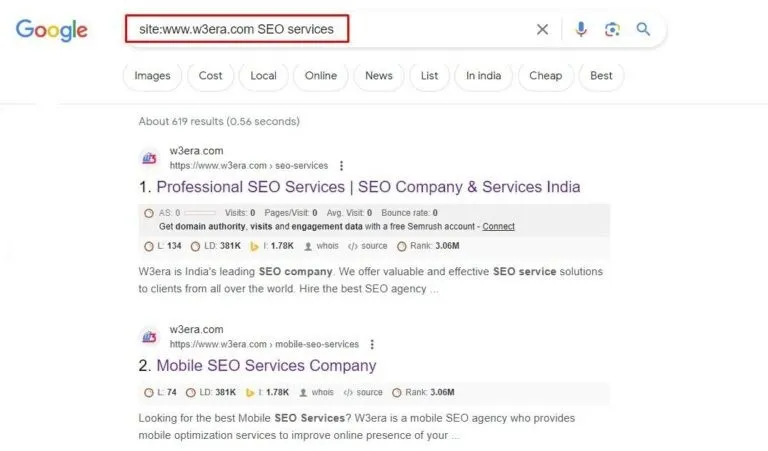
1. Using ‘site:’ operator
If you are looking for a particular website on Google, Simply type “site:www.XYZ.com” into the address bar, followed by the specific keyword.
For instance, if you want to find a particular service that W3Era offers to businesses, like mobile SEO services, you can type “site:www.w3era.com mobile SEO” and hit enter.
This will generate a list of results with the specific service on the website that mentions “mobile SEO”. It is a great way to narrow your search to a specific site.
Another creative method to find related websites is using the “related:” operator. Type “related:www.example.com” into the Google search bar, displaying a list of websites related to a target domain.
3. Using ‘cache:’ operator
You can easily search for websites on Google using various operators. One of the most used and helpful operators is “cache:”, which lets you view a cached version of the website’s page you are looking for.
For example:
If you type “cache:https://www.w3era.com/tool/google-index-checker/” into the search bar, you will see the cached version of the specific page of a website.
W3Era also provides a free SEO tool, “Google Cache Checker” to determine the cached version of the website’s pages. In this free tool, you can enter multiple links up to 20 links to determine the cached pages of the website.
4. Using ‘inurl:’ operator
Another way to find the website is to use the “inurl:” operator. It allows you to discover websites with a specific word in their URL.
For instance, to find websites containing the word “SEO company in Delaware” in the URL, type “inurl: SEO company in Delaware” into the search bar, and you will get a list of such websites.
5. Using ‘intitle:’ operator
You can also use the “intitle:” operator to discover websites that contain a particular word in their title.
For instance, if you are looking for websites with the word “Google Advanced Image Search” in their titles, simply type “intitle:Google Advanced Image Search” into the Google search bar and press enter.
What is the Difference Between Search Google and Type a URL?
The primary distinction between “Search Google” lies in how you use a search engine to locate a website based on keywords or phrases. This method is convenient when you know the exact URL or web address of the website you want to visit. The search engine generates a list of results, and you can select the most relevant website from there.
The choice between the two options depends on the user’s preference and the specific task. If someone knows the website they want to visit, the “Type a URL” feature is more convenient as it lets them directly enter the URL into the address bar.
On the other hand, if the objective is to find information or content on the internet, then “Search Google” might be the better option.
How Can Search Google or Type a URL Enhance Your Searching Experience?
To enhance the experience of internet surfers, Google has developed a convenient way of providing suggestions for the results we want. You must have seen those suggestions popping out, just below the address bar to give you suggestions based on the keywords.
For instance, if you start typing “W3Era”, Google may display predictions like “W3Era photos”, “W3Era reviews”, or “W3Era services”. Clicking on one of these predictions can take you directly to the relevant website, or you can continue typing your query.
This feature is called Google Autocomplete Predictions.
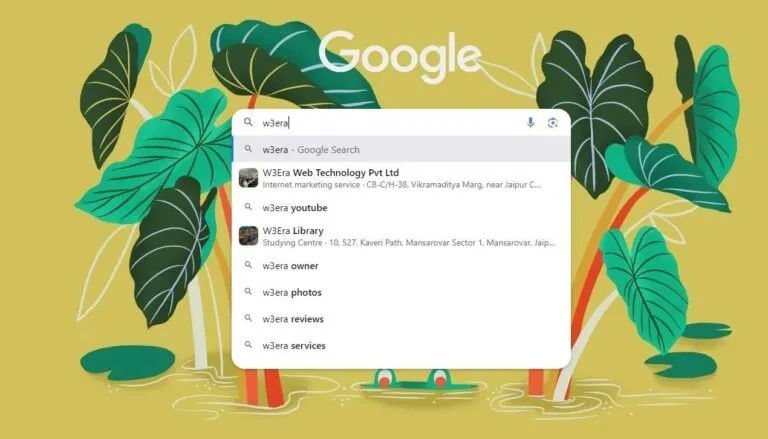
Apart from predictions, the “Search Google or type a URL” feature helps users to:
-
Save time
-
Get personalized suggestions based on search history
-
Achieve accurate search results
-
Seamless browsing experience
Overall, the “Search Google or type a URL” feature is a time-saving and convenient tool that enhances your browsing experience and helps you find information quickly and accurately.
Search Google or Type a URL: Which is the better option?
The “Search Google or Type a URL” feature offers flexibility in navigating the web. There is no right or wrong way to use it; it depends on your needs and preferences. If you are still exploring and unsure about what you are looking for, using the Google search bar can be a great option.
However, if you know the specific URL you want to visit, directly typing it into the address bar might be more convenient. It is all about finding the approach that suits you best.
The “Search Google or type a URL” feature is a valuable addition to the search engine, saving users time searching for information online. It is a helpful tool for enhancing browsing experiences and improving search speed for those who prefer a quick and direct approach.
Voice & Visual Search Are Changing Navigation
The way people search online is changing fast. More users now rely on voice and visual search instead of typing.
With voice search, you can speak to your device instead of typing. For example:
- “Open Instagram”
- “Search for best cafes in Jaipur”
- “Navigate to W3era”
It’s quick, easy, and works well on mobile phones and smart speakers.
Visual search is also becoming popular. Tools like Google Lens let you take a photo of something, like a product or place, and get instant information or related search results. You don’t need to type anything.
In fact, image-based searches have increased by 31% in the over year. This shows more people now prefer to search with photos instead of words.
SEO Tip: To stay visible, websites should use clear image alt tags, add image schema, and make content that works well with voice search.
Optimizing your business for direct search and branded navigation? Here's how.
What About Privacy & Security? Here’s the Difference
If you care about online privacy, typing the website URL directly into the browser is a smart choice.
When you do this, you avoid being tracked by search engines and third-party sites. It’s faster and more private, especially when visiting secure websites.
But if you search a site name on Google, your search is recorded. You might also see ads or get distracted by other links, even from competitors. Businesses targeting competitive search markets often depend on reliable SEO services in USA to improve rankings, online visibility, and consistent organic traffic.
Typing a URL directly means fewer middlemen and more privacy.
Many privacy-first users now prefer direct navigation or use browsers like DuckDuckGo or Brave.
Tip: Bookmark your most-used websites or use a privacy-focused browser to reduce online tracking.
Direct navigation demands fast-loading sites—here’s how to boost yours.
Website speed and performance tips
Conclusion
In 2025, people will use the internet in different ways depending on what’s easiest for them.
- If you want speed and privacy, just type the website URL.
- If you are exploring or not sure where to go, use Google Search.
- Voice search is great when you are busy, and
- Visual search helps you find things with a quick photo.
Tools like Chrome’s Omnibox make all these options easier and quicker. Knowing the pros and cons of each method helps you browse smarter.
Optimize for All Paths with W3era
No matter how people reach your website by typing, searching, or voice, W3era ensures you're visbile, fast and optimized.
Want better traffic and faster results?
Get in touch with us today and let our experts optimise your site for all users.