Website migrations are necessary for growth, but they can also be risky for SEO. Whether you're switching domains, redesigning your website, or moving to a new CMS, small errors during the migration process can lead to traffic drops and ranking losses that affect your business.
In this post, we’ll walk through 12 common website migration mistakes that can harm your SEO. By understanding these potential pitfalls and how to avoid them, you can ensure a smoother migration that keeps your rankings intact and preserves your organic traffic.
Website migration mistakes, such as broken redirects, lost backlinks, or indexing issues, can result in traffic drops and SEO ranking losses. These SEO migration errors disrupt your site's visibility and user experience, but with the right precautions, you can avoid them.
Key Takeaways
- Redirects and internal links must be accurately mapped to avoid broken site structures and 404 errors.
- Site speed and mobile optimization failures can negatively affect rankings and user experience.
- Keep sitemaps, meta tags, and structured data updated to maintain SEO value.
- Conduct a post-migration SEO audit to monitor and address issues post-launch.
Why Website Migrations Cause Traffic Drops
Even the best-laid plans can go awry during a website migration. If migration errors are made, search engines may struggle to index your site properly, or worse, they may drop key pages from their results altogether.
The result? Traffic drops, ranking losses, and frustrated users.
Here are 12 common website migration errors that can wreak havoc on your SEO and how to prevent them.
Key Website Migration Issues That Cause Traffic Drops and SEO Problems
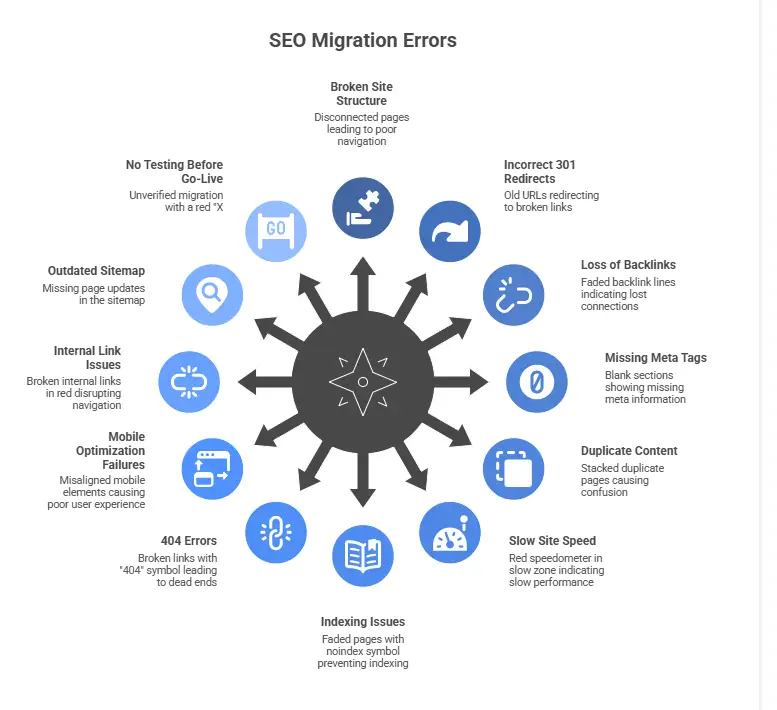
1. Broken Site Structure (Disconnected Pages)
When migrating a site, pages can easily become disconnected or lost, leading to a broken site structure. This makes it difficult for both users and search engines to navigate the site, causing a drop in rankings.
Fix:
Ensure your new site structure mirrors or improves the previous one. During migration, update all links and ensure that no pages are left behind.
2. Incorrect 301 Redirects (Old URLs to Broken Links)
Incorrect 301 redirects are a major SEO migration error. Without them, users are sent to broken links, and search engines lose track of valuable content, which harms rankings and traffic.
Fix:
Create a comprehensive redirect mapping plan to ensure every old URL redirects to the most relevant new page. Test all redirects before launching.
3. Loss of Backlinks (Faded Backlink Lines)
If your site loses backlinks during migration, your SEO value diminishes. When backlinks are pointing to non-existent pages, you lose the link equity that those backlinks provide.
Fix:
Map your backlinks and ensure that they point to the new URLs via correct redirects. Reach out to websites with high-value backlinks if necessary to update them.
Meta tags and structured data are crucial for SEO. If these elements are missing or incorrectly implemented during migration, search engines might not fully understand your site’s content, leading to poor visibility.
Fix:
Transfer all meta tags, structured data (such as schema), and rich snippets to the new site. Ensure each page is fully optimized for search engines.
5. Duplicate Content (Stacked Duplicate Pages)
Duplicate content can confuse search engines and dilute ranking signals. When migrating, multiple versions of the same content can appear if canonical tags aren’t set up correctly, leading to stacked duplicate pages.
Fix:
Use canonical tags to specify the preferred version of duplicate pages and avoid any indexing issues.
6. Slow Site Speed (Red Speedometer in Slow Zone)
If your new website is slower than the previous one, this can affect user experience and SEO rankings. Slow site speed impacts both rankings and conversion rates.
Fix:
Test your site’s speed using tools like Google PageSpeed Insights and GTmetrix. Optimize images, reduce JavaScript and CSS files, and leverage browser caching to improve load times.
7. Indexing Issues (Faded Pages with Noindex Symbol)
Indexing issues often arise when pages are mistakenly marked with “noindex” tags or are blocked in the robots.txt file. These issues prevent search engines from crawling and indexing pages, which can result in missed opportunities.
Fix:
Review your robots.txt file and noindex tags to ensure they are correctly set. Use Google Search Console to monitor indexing and crawling after migration.
8. 404 Errors (Broken Links with "404" Symbol)
After a migration, 404 errors are common, especially if old URLs aren’t properly redirected to the new ones. Broken links affect both user experience and SEO rankings, as search engines may not index or rank the pages properly.
Fix:
Check for any broken links or 404 errors using a tool like WRanker, Screaming Frog or Ahrefs. Implement 301 redirects for any outdated links.
9. Mobile Optimization Failures (Misaligned Mobile Elements)
As mobile-first indexing becomes more prevalent, ensuring that your new site is optimized for mobile is non-negotiable. Mobile optimization failures can lead to poor user experience and ranking drops.
Fix:
Make sure your site is responsive and works smoothly across all devices. Test your new site’s mobile friendliness using Google’s Mobile-Friendly Test.
10. Internal Link Issues (Broken Internal Links in Red)
When pages are moved, it’s easy for internal links to become broken, leading to red flags in internal links. This disrupts navigation and can hurt SEO performance.
Fix:
Check and update all internal links to ensure they point to the correct pages. Regularly monitor internal linking during and after the migration.
11. Outdated Sitemap (Missing Page Updates)
A sitemap that’s not updated after migration means that search engines can’t crawl your pages correctly. If your sitemap is outdated or incomplete, it can prevent Google from finding all the important content on your site.
Fix:
Generate and submit an updated sitemap after migration. Ensure that all new URLs are included and that it’s submitted to Google Search Console and Bing Webmaster Tools.
12. No Testing Before Go-Live (Unverified Migration with Red "X")
Skipping the testing phase before a website goes live is one of the most dangerous mistakes you can make. Without testing, you won’t catch issues like broken redirects, broken internal links, or missing content until it’s too late.
Fix:
Test everything before launching the new site, including redirects, internal links, indexing, and mobile optimization. Use a staging environment to test the site thoroughly.
How to Avoid These Common Website Migration Errors
- Plan Your Migration Carefully: Start with a clear SEO migration plan and keep track of all URLs, redirects, and critical elements.
- Test Before Go-Live: Always test redirects, content, and technical functionality in a staging environment.
- Use SEO Migration Services: If you’re unsure or migrating a large site, work with an experienced SEO migration consultant to ensure everything is handled properly.
Conclusion
Website migrations don’t have to result in a drop in traffic or rankings. By proactively addressing common website migration mistakes, like missing redirects or slow site speeds, you can ensure that your migration is successful and your SEO performance is maintained.
If you’re planning a migration, make sure you follow a clear SEO migration checklist and test everything before going live. For larger migrations or complex sites, partnering with an SEO migration consultant can help you avoid costly mistakes and protect your site’s visibility.
People Also Read: How Professional SEO Migration Prevents Traffic and Revenue Loss (2026 Guide)