An image sitemap is an XML sitemap that helps search engines discover and understand the images on your website. It provides Google with information about image URLs, making it easier to crawl and index images that may not be easily found through standard website crawling. Image sitemaps are particularly useful for ecommerce websites, photography portfolios, publishers, and websites with large image libraries. While they don't directly improve rankings, they support image discovery, Google Images visibility, crawl efficiency, and overall technical SEO when combined with optimized image filenames, alt text, structured data, and strong website architecture.
Key Takeaways
- An image sitemap helps search engines discover important images on your website.
- It complements a standard XML sitemap by listing image URLs associated with webpages.
- Image sitemaps improve image discovery but do not directly increase rankings.
- Ecommerce, media, travel, and photography websites benefit the most from image sitemaps.
- Combining image sitemaps with image SEO best practices can improve visibility in Google Images.
- Image sitemaps work alongside website architecture, internal linking, and crawl optimization to support technical SEO.
- Regularly updating your image sitemap ensures newly published images are available for search engines to discover.
What Is an Image Sitemap?
Images play an important role in modern websites. They make content more engaging, improve user experience, showcase products, explain complex ideas, and help websites attract traffic from Google Images. However, if search engines can't discover or understand your images, those opportunities can be lost.
An image sitemap helps solve this problem.
It provides Google with additional information about the images on your website, making it easier to discover and crawl important visual content. While search engines can often find images through regular crawling, an image sitemap offers a more reliable way to highlight images that may otherwise be missed, especially on large or dynamic websites. If your website relies heavily on product images, infographics, photography, illustrations, or other visual assets, implementing an image sitemap can strengthen your overall technical SEO strategy.
In this guide, you'll learn:
- What an image sitemap is
- How it works
- Why it matters for SEO
- Image sitemap vs. XML sitemap
- Key benefits and use cases
- Best practices for optimization
- Common mistakes to avoid
- How to create, submit, and maintain an image sitemap
By the end of this guide, you'll understand how image sitemaps fit into a modern SEO strategy and when your website should use one.
What Is an Image Sitemap?
An image sitemap is a specialized XML sitemap that helps search engines discover the images on your website.
Unlike a standard XML sitemap, which focuses on webpage URLs, an image sitemap includes information about the images associated with those pages. This helps Google identify image files that may not be easily discovered during normal website crawling.
Think of it as an extension of your XML sitemap.
A standard XML sitemap tells search engines:
- Which webpages exist
- When they were updated
- How they're organized
An image sitemap goes a step further by telling search engines:
- Which images belong to each page
- Where those images are located
- Which visual assets are important to crawl
This additional information is especially valuable for websites that use JavaScript galleries, image sliders, lazy loading, or content delivery networks (CDNs), where images may not always be immediately visible during the initial crawl.
Why Are Image Sitemaps Important?
Search engines have become increasingly capable of automatically discovering images. However, some images can still be difficult to find, particularly on websites with complex layouts or dynamic content.
An image sitemap provides an additional discovery path that helps search engines locate important images more efficiently. It complements your existing XML sitemap and supports a more complete understanding of your website's visual content.
This is particularly valuable for websites that publish:
- Product galleries
- Blog graphics
- Infographics
- Tutorials
- Portfolio images
- Travel photography
- News media
- Educational diagrams
The easier it is for Google to discover these assets, the greater the opportunity for them to appear in Google Images and other visual search features.
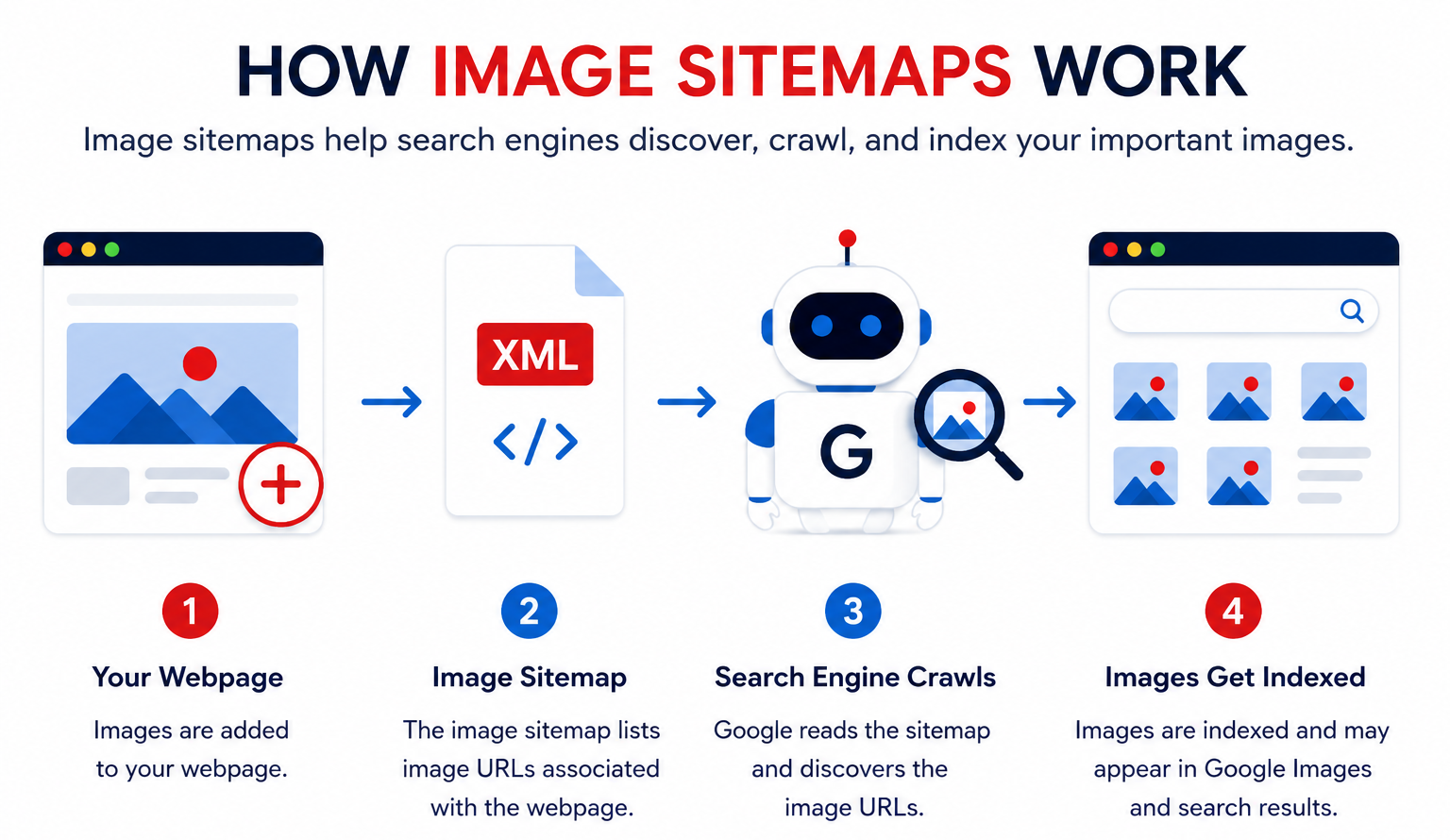
How Does an Image Sitemap Work?
An image sitemap follows the same XML structure as a standard sitemap but includes additional image information for each webpage.
When Google reads the sitemap, it can understand:
- Which pages contain images
- Which images belong to each page
- Where those images are hosted
Instead of relying only on links found during crawling, Google can use the sitemap as an additional source for discovering image assets. This is especially useful when images are loaded dynamically or hosted on external CDNs.
How Google Discovers Images
Google can discover images through several methods, including:
- Crawling webpages
- Internal links
- XML sitemaps
- Image sitemaps
- Structured data
- Google Image indexing systems
An image sitemap doesn't replace these methods—it strengthens them.
For the best results, combine an image sitemap with:
- Optimized image filenames
- Descriptive alt text
- Responsive image formats
- Strong internal linking
- A logical website structure
If you're already following best practices for Website Architecture and Internal Site Architecture, adding an image sitemap further improves how search engines discover your visual content.
Image Sitemap vs XML Sitemap
Although they look similar, they serve different purposes.
| Image Sitemap |
XML Sitemap |
| Lists image URLs |
Lists webpage URLs |
| Helps search engines discover images |
Helps search engines discover webpages |
| Supports image indexing |
Supports page indexing |
| Ideal for image-rich websites |
Recommended for nearly all websites |
| Complements an XML sitemap |
Forms the foundation of website discovery |
Rather than choosing one over the other, most websites benefit from using both together.
If you're new to XML sitemaps, our XML Sitemap Guide explains how they help search engines crawl and index your website more effectively.
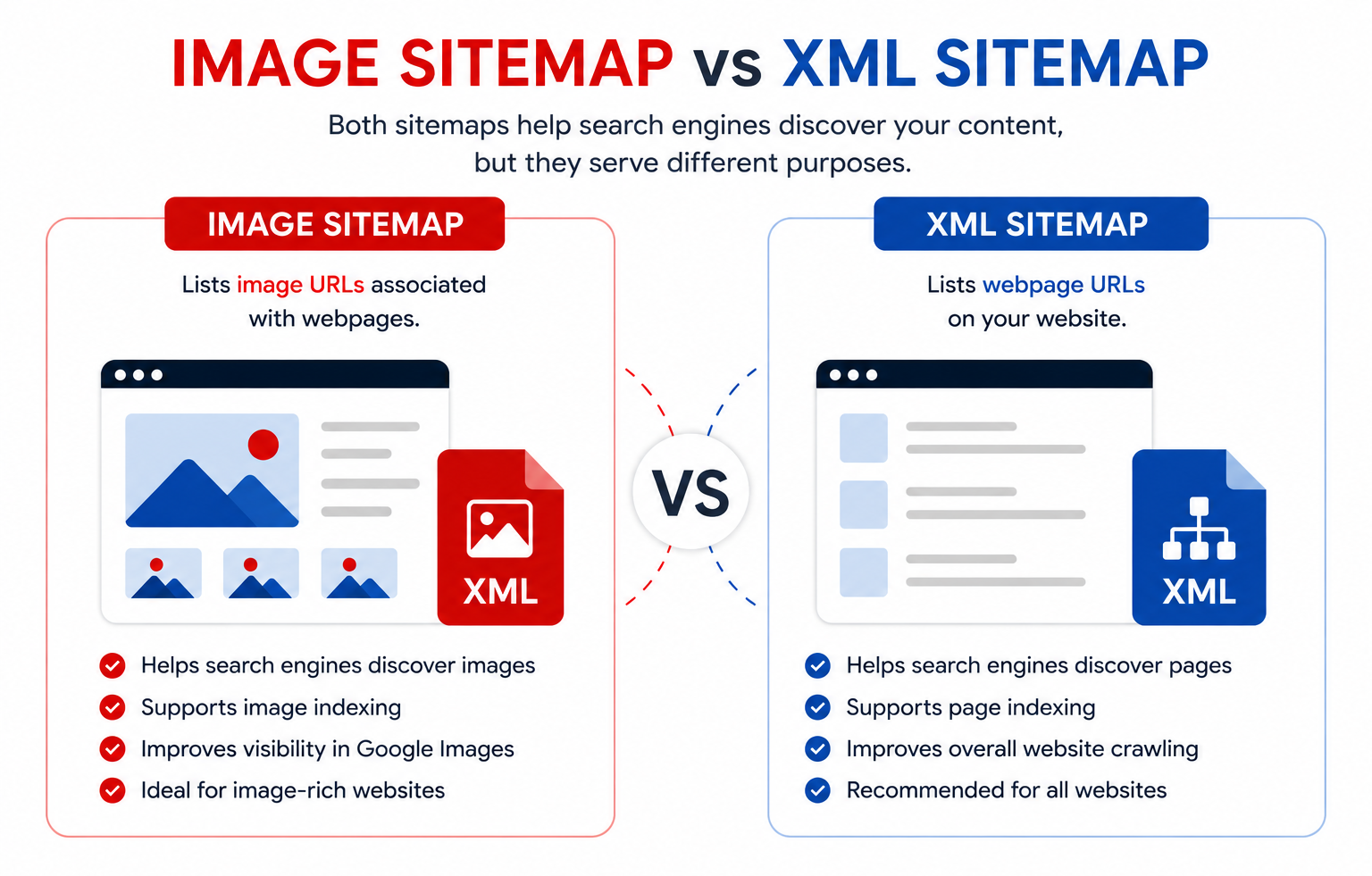
Image Sitemap vs HTML Sitemap
An image sitemap and an HTML sitemap serve different audiences. An HTML sitemap is designed for users, helping them navigate a website through organized internal links. An image sitemap is designed for search engines, helping them discover image resources more efficiently. Together with a standard XML sitemap, they form part of a strong technical SEO foundation.
Benefits of an Image Sitemap
Improves Image Discovery
An image sitemap helps search engines locate images that may not be easily found during normal crawling, particularly when websites use JavaScript, lazy loading, or complex image galleries.
Supports Google Images Visibility
Images that are easier to discover have a better chance of appearing in Google Images, creating another potential source of organic traffic.
Helps Large Websites Manage Visual Content
Websites with thousands of product photos, category banners, or media assets benefit from a more organized approach to image discovery.
Strengthens Technical SEO
Image sitemaps complement other technical SEO elements, including:
- XML sitemaps
- Crawl optimization
- Website indexing
- Structured data
- Internal linking
Together, these create a stronger foundation for search engines to crawl and understand your website.
Improves Content Accessibility
Many educational articles, tutorials, and guides rely on screenshots, diagrams, and infographics. An image sitemap helps ensure these supporting visuals are discoverable alongside the content they enhance.
Which Websites Should Use an Image Sitemap?
Image sitemaps are particularly valuable for:
- Ecommerce websites with extensive product catalogs
- Photography and portfolio websites
- Travel and hospitality websites
- News and publishing platforms
- Real estate websites
- Educational websites with diagrams and illustrations
- Businesses that publish visual guides or infographics
Smaller websites with only a few images may not see a significant difference, but as your content library grows, an image sitemap becomes increasingly useful for maintaining strong image discoverability.
How to Create an Image Sitemap
Creating an image sitemap is easier than many website owners think. The exact process depends on your CMS and website setup, but the goal remains the same: help search engines discover the important images on your website more efficiently.
Google recommends including image information either in your existing XML sitemap or in a separate image sitemap. Both methods are supported as long as the sitemap follows Google's requirements.
Let's walk through the process step by step.
Step 1: Identify the Images You Want Search Engines to Discover
Not every image on your website needs to be included.
Focus on images that provide value to users and support your content, such as:
- Product images
- Blog feature images
- Infographics
- Charts and diagrams
- Portfolio images
- Category banners
- Service illustrations
- Tutorial screenshots
You generally don't need to include:
- Background images
- Decorative icons
- UI elements
- Social sharing icons
- Tracking images
The goal is to help Google discover images that contribute to your content and may appear in Google Images.
Step 2: Generate Your Image Sitemap
Most websites generate image sitemaps automatically.
Popular options include:
WordPress
Plugins such as:
- Rank Math
- Yoast SEO
- XML Sitemap Generator
can automatically generate image sitemaps.
Shopify
Most Shopify SEO apps automatically include product images in XML sitemaps.
Magento
Magento includes built-in sitemap functionality for large ecommerce stores.
Custom Websites
Developers can generate image sitemaps using server-side scripts that follow Google's XML sitemap specifications.
Step 3: Verify Your Image URLs
Before submitting your sitemap, make sure every listed image:
- Returns a 200 status code
- Is crawlable
- Isn't blocked by robots.txt
- Loads correctly
- Uses the preferred HTTPS version
Broken or inaccessible image URLs reduce the effectiveness of your sitemap.
Step 4: Submit the Sitemap in Google Search Console
Once your sitemap is ready:
- Open Google Search Console.
- Navigate to Sitemaps.
- Enter your sitemap URL.
- Click Submit.
Google will periodically revisit the sitemap to discover new images.
Google supports several image-specific tags within an image sitemap. These help identify image URLs and provide additional information where applicable.
The most important element is:
Image Location
This specifies the URL of the image associated with a webpage.
Google also documents optional metadata fields, though not all historical image tags are currently used for Search. Always follow Google's latest documentation when generating your sitemap.
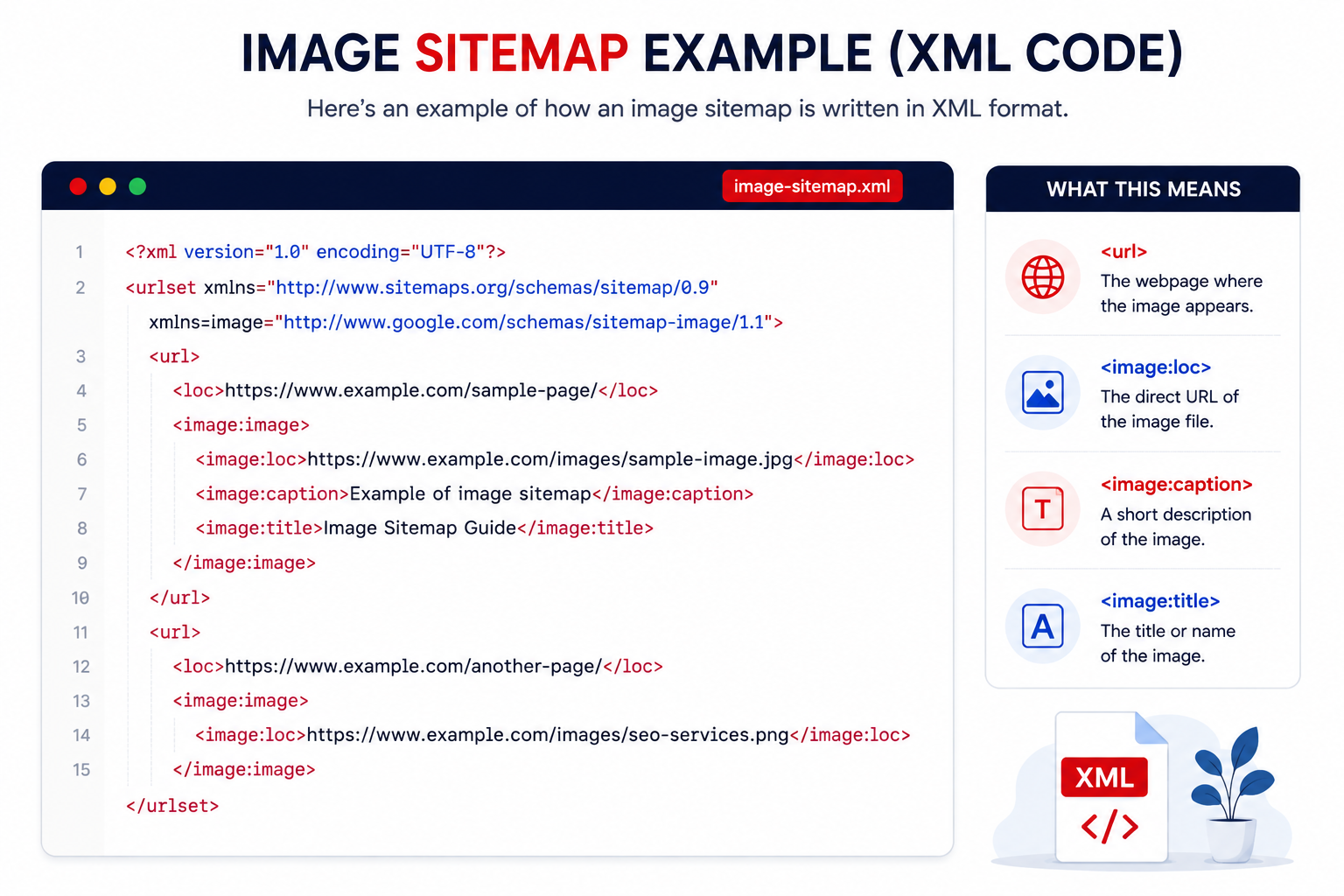
Image Sitemap Best Practices
Creating an image sitemap is only part of the process. Following best practices helps search engines discover, crawl, and understand your images more effectively.
Use High-Quality Images
Low-resolution or blurry images provide a poor user experience.
Use clear, properly sized images that match the content of the page.
Give Images Descriptive File Names
Instead of:
IMG_001.jpg
Use:
image-sitemap-example.jpg
Descriptive filenames help search engines better understand image content.
Write Meaningful Alt Text
Alt text improves accessibility while giving search engines additional context.
Example:
Bad
image
Good
Image sitemap example showing XML image tags for SEO
Well-written alt text should describe the image naturally.
Compress Images
Large image files slow down page speed.
Use compression without sacrificing quality.
Popular formats include:
- WebP
- AVIF
- Optimized JPEG
- Optimized PNG
Fast-loading images improve both user experience and Core Web Vitals.
Use Responsive Images
Visitors browse websites on different screen sizes.
Responsive images ensure the appropriate image size loads on each device.
Don't Block Image URLs
Check your robots.txt file to ensure important image directories aren't blocked.
Blocking image folders can prevent Google from accessing your visual content.
If you're unsure how robots.txt affects crawling, our Robots.txt Guide explains how to manage crawler access effectively.
Use Structured Data Alongside Image Sitemaps
Image sitemaps and structured data work well together.
Structured data provides additional context about images, products, recipes, articles, and other content types.
Together they improve how search engines interpret visual content.
Common Image Sitemap Mistakes
Many websites create image sitemaps but overlook important details.
Avoid these common issues.
Including Broken Image URLs
Every image listed in the sitemap should load successfully.
Broken image URLs create unnecessary crawl errors.
Blocking Images in Robots.txt
Some websites accidentally prevent Google from crawling image folders.
Always verify your robots.txt configuration after updating image directories.
Using Duplicate Images
If multiple URLs display identical images, Google may ignore duplicates.
Where possible, use canonical versions and avoid unnecessary duplication.
Forgetting New Images
Many businesses regularly upload:
- Blog graphics
- Product photos
- Infographics
But forget to update the sitemap.
Automatic sitemap generation solves this problem.
Ignoring Image Optimization
An image sitemap doesn't replace image SEO.
Images should still include:
- Optimized filenames
- Alt text
- Compression
- Proper dimensions
These factors work together.
Image Sitemaps for Ecommerce Websites
Ecommerce websites often contain thousands of images.
Examples include:
- Product photos
- Category banners
- Brand logos
- Variant images
- Lifestyle images
- Collection pages
Without an organized image sitemap, some of these assets may be difficult for Google to discover.
An image sitemap helps ensure that important product images are included in Google's crawling process, particularly for large online stores.
Image Sitemaps and Content Delivery Networks (CDNs)
Many modern websites host images on a CDN to improve performance.
Google can discover CDN-hosted images, provided they are accessible and correctly referenced in your sitemap.
Best practices include:
- Use consistent HTTPS URLs.
- Avoid blocked CDN paths.
- Keep image URLs accessible.
- Verify images return a 200 status code.
Proper CDN configuration supports both SEO and website performance.
Image Sitemaps and Lazy Loading
Lazy loading improves page speed by delaying image loading until users scroll. While this benefits performance, poorly implemented lazy loading can make image discovery more challenging. An image sitemap helps search engines discover important images even when they load dynamically.
For a deeper understanding of this topic, explore our guide on Lazy Loading, where we explain how it affects SEO, Core Web Vitals, and crawlability.
Optimizing an image sitemap is only one part of a successful technical SEO strategy. To maximize image visibility, businesses also need a well-structured website, efficient crawling, strong internal linking, and optimized image delivery. If you're looking to improve your organic search performance, explore our seo company in the USA to learn how our experts build technically optimized websites that help search engines discover, crawl, and rank both webpages and images.
Want Better Image Visibility and Higher Organic Rankings?
An optimized image sitemap is only one part of technical SEO. Our USA SEO experts improve website architecture, image SEO, crawlability, indexing, and overall search performance to help your business grow with sustainable organic traffic.
How to Audit an Image Sitemap
Creating an image sitemap is only the beginning. To get the best SEO results, you should review it regularly to ensure it remains accurate, up to date, and free from errors.
As your website grows, new images are added, old ones are removed, and some image URLs may change. A regular audit helps search engines continue discovering your most valuable visual content.
Here's how to audit an image sitemap effectively.
Check That All Image URLs Are Accessible
The first step is verifying that every image listed in your sitemap is accessible.
Each image should:
- Return a 200 OK status code.
- Load correctly in a browser.
- Use the preferred HTTPS version.
- Be crawlable by search engines.
Broken or inaccessible image URLs reduce the effectiveness of your sitemap and can create unnecessary crawl issues.
Review Image Indexing in Google Search Console
Google Search Console helps you understand whether Google is discovering your image sitemap correctly.
Look for:
- Submitted sitemap status
- Crawled pages
- Index coverage
- Crawl errors
- Excluded pages
If you notice indexing issues, investigate whether they relate to blocked resources, duplicate images, or inaccessible URLs.
Verify Images Are Not Blocked
Sometimes image folders are unintentionally blocked.
Check your:
- robots.txt
- CDN settings
- Server permissions
- Firewall rules
Google must be able to access image URLs listed in your sitemap.
Remove Outdated Images
Over time, websites remove:
- Old products
- Deleted blog posts
- Expired landing pages
Their images should also be removed from the sitemap.
Keeping outdated URLs increases crawl waste and creates unnecessary maintenance issues.
Monitor New Images
Whenever you publish:
- New blog posts
- Product pages
- Landing pages
- Case studies
- Infographics
ensure those images are included automatically.
Automated sitemap generation is the best long-term solution.
Several SEO tools can help monitor your image sitemap.
Google Search Console
Best for:
- Sitemap submission
- Crawl reports
- Index coverage
- Image discovery monitoring
Screaming Frog SEO Spider
Useful for:
- Broken image URLs
- Missing alt text
- Image redirects
- Internal image links
- Large image files
Semrush Site Audit
Helps identify:
- Technical SEO issues
- Crawlability problems
- Broken media
- Internal linking issues
Ahrefs Site Audit
Useful for auditing:
- Crawl depth
- Internal links
- Broken pages
- Technical SEO health
Sitebulb
Provides visual reports for:
- Website architecture
- Internal linking
- Crawl paths
- Orphan pages
- Image resources
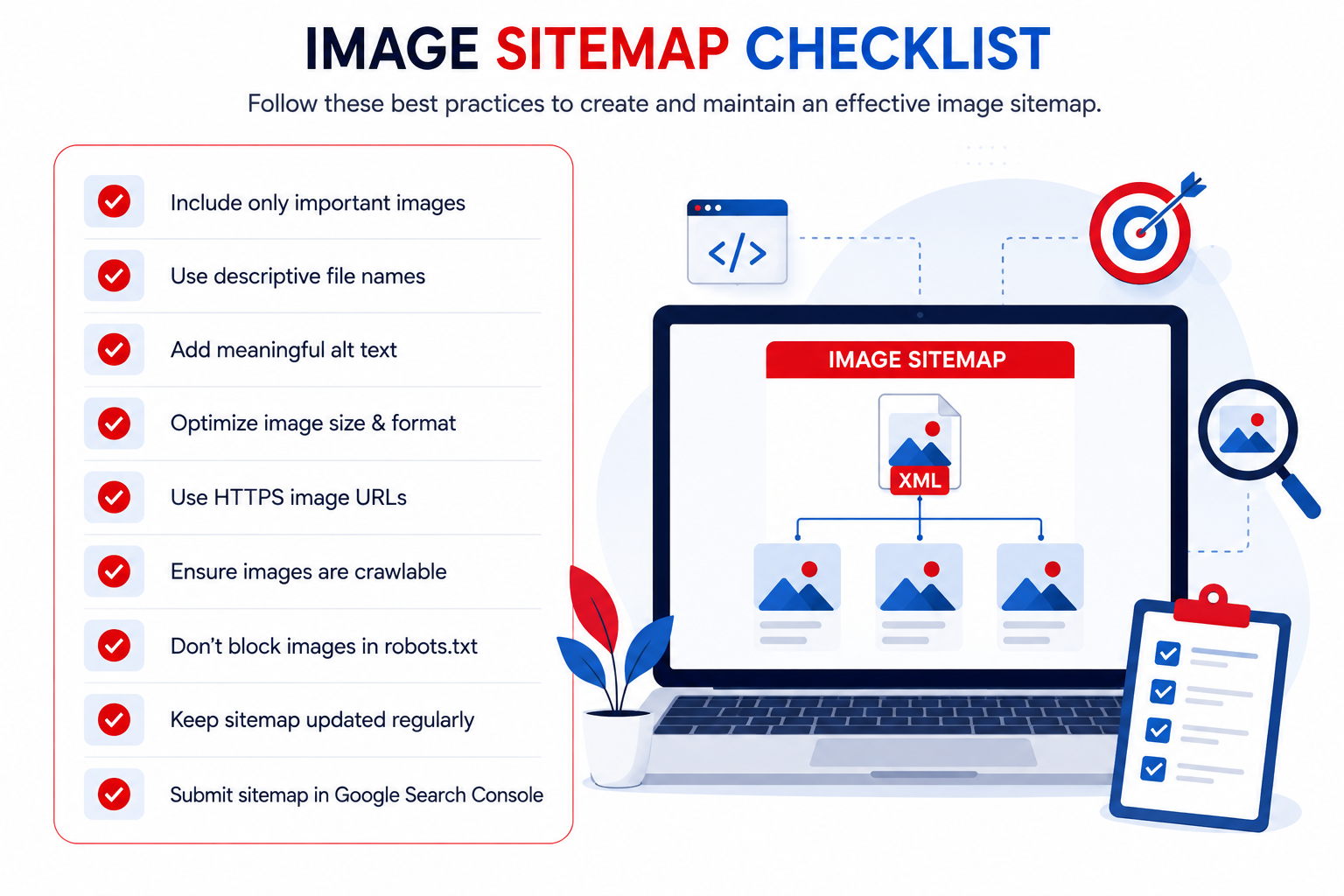
Image Sitemap Checklist
Before publishing or updating your image sitemap, review this checklist.
Technical Checklist
- All important images are included.
- Images return a 200 status code.
- HTTPS image URLs are used.
- Images are crawlable.
- Robots.txt doesn't block image folders.
- Image URLs are canonical.
- Images load correctly on mobile.
SEO Checklist
- Descriptive filenames
- Optimized alt text
- Compressed images
- Responsive image sizes
- WebP or AVIF where appropriate
- Structured data implemented where relevant
Maintenance Checklist
- Sitemap updates automatically.
- Deleted images are removed.
- New images are added.
- Broken URLs are fixed.
- Google Search Console is monitored regularly.
Image Sitemap and Image SEO
An image sitemap alone won't improve rankings.
It works best alongside strong image SEO.
For every image, you should also optimize:
Image Filename
Example:
Bad
IMG00045.jpg
Good
technical-seo-image-sitemap-guide.webp
Alt Text
Describe the image naturally.
Example:
Good Alt Text
"Image sitemap example showing how Google discovers product images."
Image Compression
Large images slow websites.
Compress images without reducing quality.
Use:
when supported.
Responsive Images
Different devices require different image sizes.
Responsive images improve:
- Mobile performance
- Core Web Vitals
- User experience
Image Sitemaps and Google Images
Many website owners focus only on traditional search results.
However, Google Images represents another valuable source of organic traffic.
If Google can:
- Discover
- Crawl
- Understand
- Index
your images effectively, they may become eligible to appear in Google Images and other visual search experiences. An image sitemap improves image discovery, but visibility still depends on image quality, relevance, and overall page context.
Do You Always Need an Image Sitemap?
No.
Small websites with only a few easily discoverable images may not need one.
However, you should strongly consider using an image sitemap if your website contains:
- Hundreds of images
- Product galleries
- Photography portfolios
- News articles
- Tutorials
- Infographics
- Dynamic image loading
- CDN-hosted media
For these websites, image sitemaps provide additional discovery signals that support long-term SEO.
Conclusion
Images are an essential part of modern websites, but search engines can't benefit from them if they aren't able to discover and understand them. An image sitemap gives Google another way to find important visual content, especially on websites with large image libraries, ecommerce catalogs, or dynamically loaded media. Although an image sitemap isn't a direct ranking factor, it supports image discovery, crawl efficiency, and technical SEO when combined with optimized filenames, descriptive alt text, strong internal linking, structured data, and a well-organized website architecture. As your website grows, keep your image sitemap updated, monitor it in Google Search Console, and review it during regular technical SEO audits. Combined with broader image SEO best practices, this helps create a stronger foundation for both Google Search and Google Images.
Managing image sitemaps is only one part of building a technically optimized website. To improve crawlability, website architecture, image SEO, and overall organic visibility, businesses need a complete technical SEO strategy. Explore our seo consultant in the UK to learn how our SEO specialists help businesses across the UK build search engine-friendly websites that perform better in competitive search results.
Build an SEO-Friendly Website That Search Engines Can Crawl, Index, and Rank
From image sitemaps and technical SEO to website architecture and internal linking, our UK SEO specialists help businesses improve search visibility, increase qualified traffic, and achieve long-term organic growth.
Explore UK SEO Services