When visitors land on your website, they expect to find information quickly and effortlessly. Search engines also rely on a clear website structure to discover and understand your pages. While XML sitemaps are designed primarily for search engines, HTML sitemaps provide a user-friendly overview of your website that can also support SEO when implemented correctly.
An HTML sitemap is a dedicated webpage that lists the important pages on your website in a clear, organized format. It helps users navigate large websites, discover content that may not be easily accessible through menus, and improve the overall browsing experience. At the same time, HTML sitemaps strengthen internal linking and make it easier for search engines to discover connected pages.
Although HTML sitemaps are no longer essential for every website, they remain valuable for large websites, ecommerce stores, enterprise platforms, and websites with complex navigation structures.
In this comprehensive guide, you'll learn:
- What an HTML sitemap is
- How HTML sitemaps work
- HTML sitemap vs. XML sitemap
- SEO benefits of HTML sitemaps
- When you should use one
- How to create an HTML sitemap
- Best practices and common mistakes
- Tools for building and maintaining HTML sitemaps
What Is an HTML Sitemap?
An HTML sitemap is a webpage that displays a structured list of the important pages on your website. Unlike navigation menus, which often show only primary sections, an HTML sitemap provides visitors with a broader overview of your website's content hierarchy.
Think of it as a directory for your website.
Instead of searching through multiple menus or categories, users can access one page that links to key sections and important webpages.
A typical HTML sitemap may include:
- Main pages
- Service pages
- Product categories
- Blog categories
- Important blog posts
- Resource pages
- Contact page
- About page
For websites with hundreds or thousands of pages, the sitemap is usually organized into logical categories rather than displaying every URL on a single page.
Why HTML Sitemaps Matter
Many website owners assume that navigation menus alone are enough. However, as websites grow, finding specific content becomes more challenging. An HTML sitemap solves this problem by giving visitors a centralized view of your website's structure. For search engines, HTML sitemaps also provide additional internal links that help reinforce page relationships and improve crawl paths. Although Google can usually discover pages through internal linking, an HTML sitemap acts as another layer of organization, especially on large websites.
How Does an HTML Sitemap Work?
An HTML sitemap functions like an index page.
When someone visits the sitemap, they can browse through organized categories and click directly to important pages.
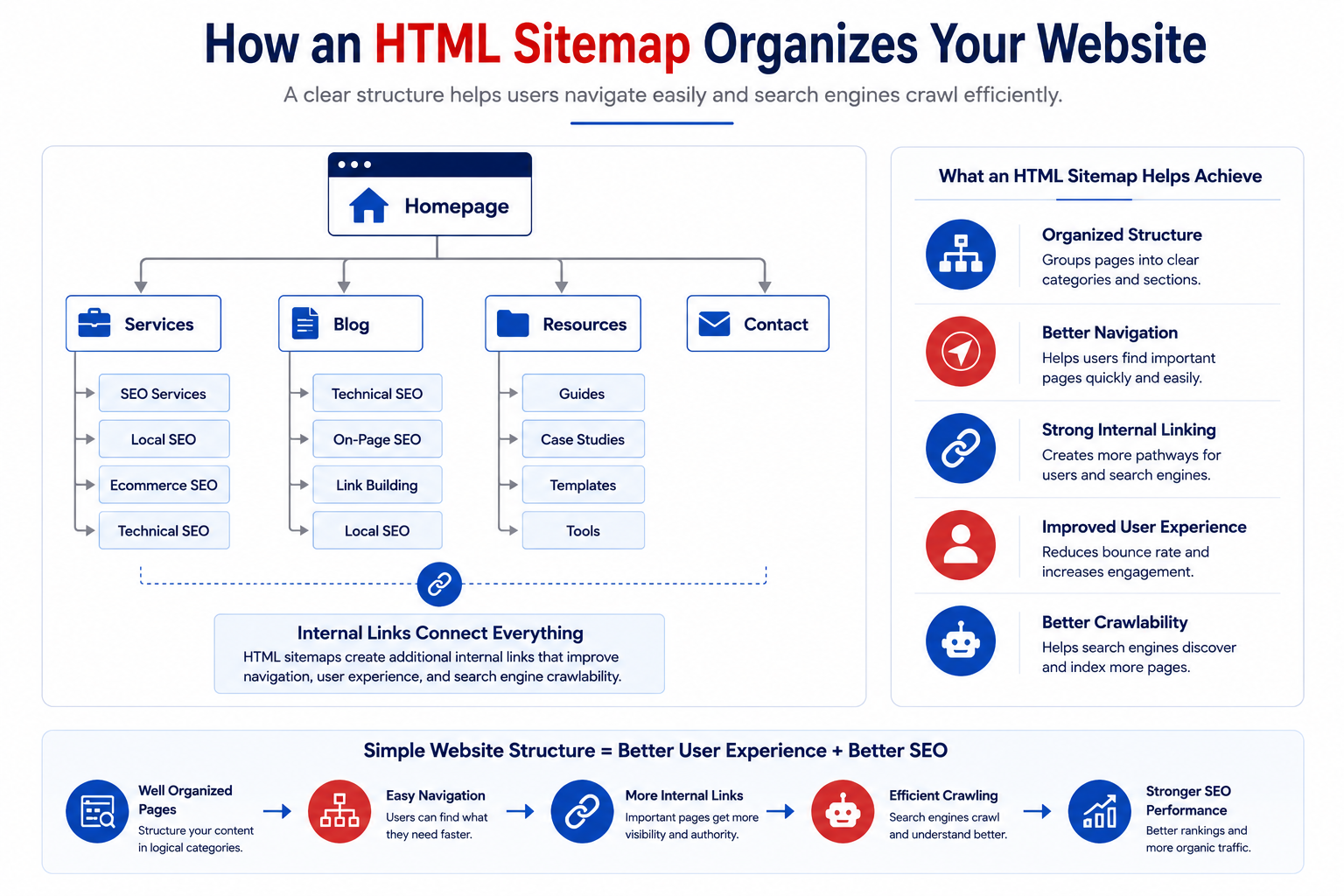
Example structure:
Home
├── Services
│ ├── SEO Services
│ ├── Local SEO
│ ├── Ecommerce SEO
│ └── Enterprise SEO
│
├── Industries
│ ├── Healthcare
│ ├── Real Estate
│ └── SaaS
│
├── Blog
│ ├── Technical SEO
│ ├── On-Page SEO
│ ├── Link Building
│ └── Local SEO
│
└── Contact
This structure helps visitors quickly understand how your website is organized.
Search engines can also follow these internal links to discover related pages.
HTML Sitemap vs XML Sitemap
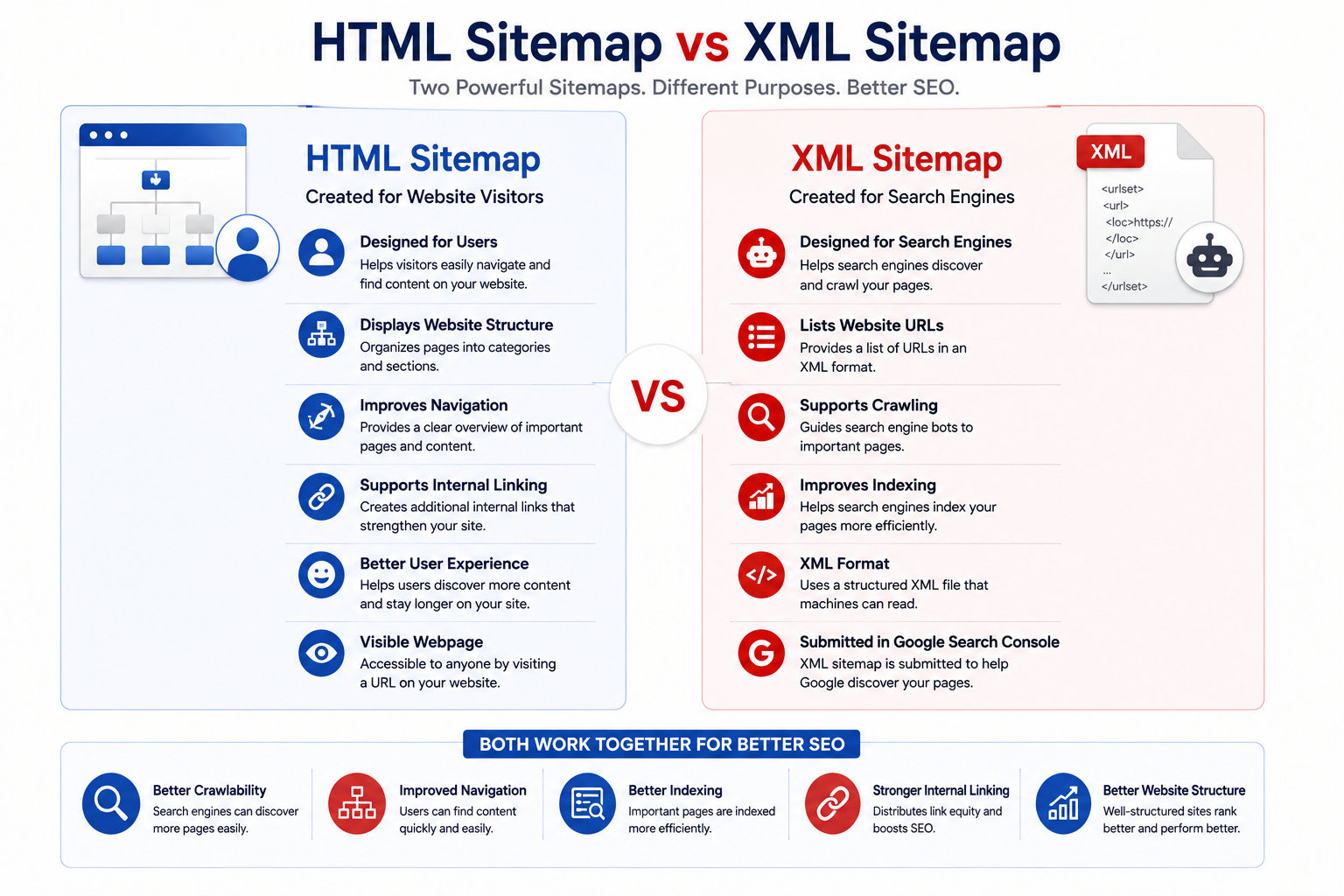
Many people confuse HTML sitemaps with XML sitemaps, but they serve different purposes.
| HTML Sitemap |
XML Sitemap |
| Designed primarily for users |
Designed primarily for search engines |
| Visible webpage |
XML file |
| Improves navigation |
Helps search engines discover URLs |
| Supports internal linking |
Supports crawling and indexing |
| Easy to browse |
Not intended for users |
The two sitemap types complement one another rather than compete. An XML sitemap tells search engines which pages exist, while an HTML sitemap helps users and search engines navigate the website more effectively. If you haven't already, learn more about XML Sitemaps in our XML Sitemap SEO Guide, where we explain how XML sitemaps improve crawling and indexing.
HTML Sitemap vs Website Navigation
Navigation menus and HTML sitemaps work together, but they aren't the same thing.
A navigation menu is designed to help users move between the most important sections of your website.
An HTML sitemap provides a broader directory that includes pages that may not appear in the main navigation.
For example, a website menu may only contain:
- Home
- Services
- Blog
- Contact
Meanwhile, the HTML sitemap can include dozens or even hundreds of additional pages organized into logical categories.
This makes it much easier for visitors to discover older content or deeper pages.
Benefits of an HTML Sitemap
Adding an HTML sitemap offers several advantages for both users and search engines.
Better Website Navigation
Visitors can quickly locate important pages without relying entirely on search functionality or multiple menu clicks. This becomes increasingly valuable on large websites with extensive content libraries.
Improved User Experience
A clear website structure helps visitors understand how your content is organized.
Instead of getting lost in complicated navigation, users can browse categories logically.
Better navigation often leads to:
- Longer session duration
- Higher engagement
- Lower bounce rates
Stronger Internal Linking
Every link within your HTML sitemap contributes to your internal linking structure.
Well-planned internal links help distribute authority across important pages while strengthening topical relationships.
For example, an HTML sitemap can naturally connect guides about Search Engine Crawling, Website Indexing, Robots.txt, and Website Architecture, helping both users and search engines discover related resources.
Easier Content Discovery
Older blog posts often become difficult to find over time.
Including them in an organized HTML sitemap gives visitors another pathway to discover valuable content.
Better Crawl Paths
Although XML sitemaps remain the primary discovery method for search engines, HTML sitemaps provide additional crawl paths through contextual internal links.
This can be particularly useful for websites with deep page hierarchies.
Do HTML Sitemaps Help SEO?
The answer is yes—but indirectly.
HTML sitemaps aren't a direct ranking factor.
Instead, they improve several areas that contribute to better SEO performance.
They help by:
- Strengthening internal linking
- Improving website organization
- Supporting crawlability
- Making content easier to discover
- Enhancing user experience
When users spend less time searching for information and search engines can efficiently navigate your website, your overall SEO performance often improves. For websites with complex navigation, an HTML sitemap can become an important supporting component of a strong technical SEO strategy.
Which Websites Should Use an HTML Sitemap?
Not every website requires an HTML sitemap.
They are most beneficial for websites with extensive content or complex structures.
Examples include:
Ecommerce Websites
Thousands of products and categories make navigation more challenging. An HTML sitemap helps users browse product sections more efficiently.
Large Business Websites
Enterprise websites often contain hundreds of service pages, industry pages, and resources. An HTML sitemap keeps these organized.
Content-Rich Blogs
Websites publishing hundreds of articles can improve content discovery by grouping related resources.
Educational Websites
Universities, online learning platforms, and documentation websites often organize content across multiple levels. An HTML sitemap improves accessibility.
Government and Nonprofit Websites
These websites frequently contain large amounts of informational content that users need to locate quickly.
Best Practices Checklist
A well-optimized HTML sitemap should:
- Include important pages only.
- Organize links into logical categories.
- Reflect your website hierarchy.
- Update automatically when new pages are published.
- Avoid broken links.
- Keep anchor text descriptive.
- Remain easy to navigate.
- Support your internal linking strategy.
How to Create an HTML Sitemap
Creating an HTML sitemap doesn't require advanced technical knowledge. The goal is to build a clear, organized page that helps visitors discover important content while supporting your website's internal linking structure.
The process may vary depending on your CMS, but the overall strategy remains the same.
Step 1: Identify Your Most Important Pages
Start by deciding which pages should appear in your HTML sitemap.
Include pages that provide real value to visitors, such as:
- Core service pages
- Product categories
- Important landing pages
- Blog categories
- High-value blog posts
- Resource pages
- Contact page
- About page
Avoid including:
- Login pages
- Privacy Policy
- Duplicate URLs
- Search result pages
- Filter URLs
- Thin content
- Tag archives with little value
Remember, an HTML sitemap is meant to improve navigation—not list every URL on your website.
Step 2: Organize Pages into Logical Categories
A well-structured sitemap is easier to browse.
Instead of displaying hundreds of links randomly, group related pages together.
Example:
Home
Services
- SEO Services
- Local SEO
- Ecommerce SEO
- Technical SEO
Industries
- Healthcare
- Real Estate
- SaaS
Resources
Company
This hierarchy improves readability while helping users understand how your website is organized.
Step 3: Use Descriptive Anchor Text
Every link in your sitemap should clearly describe the destination page.
Good examples:
- Technical SEO Guide
- Local SEO Services
- Website Architecture Guide
- XML Sitemap SEO Guide
Avoid generic anchors like:
- Click Here
- Learn More
- Read More
- Page 1
Descriptive anchor text provides better context for both users and search engines.
Step 4: Keep the Sitemap Updated
An outdated sitemap creates a poor user experience.
Whenever you publish:
- New service pages
- New blog articles
- New product categories
- New landing pages
your HTML sitemap should be updated accordingly.
Most modern CMS platforms allow automatic sitemap updates through plugins or custom templates.
HTML Sitemap Best Practices
Creating a sitemap is only the beginning. Following SEO best practices ensures it remains useful as your website grows.
Prioritize Important Pages
Focus on pages that drive traffic, conversions, or provide essential information.
Less important pages don't need to appear in the sitemap.
Quality matters more than quantity.
Follow Your Website Hierarchy
Your HTML sitemap should reflect the same structure users experience while browsing your website.
Example:
Homepage
↓
Services
↓
SEO Services
↓
Technical SEO
↓
Technical SEO Guides
A logical hierarchy improves usability and reinforces your website architecture.
Keep Navigation Simple
Avoid overwhelming visitors with hundreds of links on a single page.
For large websites:
- Divide links into categories.
- Use headings.
- Keep sections concise.
- Avoid clutter.
A clean sitemap encourages exploration rather than confusion.
Most websites link to the HTML sitemap from the footer.
This ensures visitors can access it from every page without affecting the primary navigation.
Ensure Every Link Works
Broken links reduce trust and create a poor user experience.
Regularly audit your sitemap to:
- Remove deleted URLs.
- Update redirected pages.
- Fix broken internal links.
Optimize for Mobile Users
Many visitors browse websites from smartphones.
Your HTML sitemap should:
- Be responsive.
- Use readable fonts.
- Include adequate spacing.
- Be easy to scroll.
Good usability benefits both visitors and engagement metrics.
HTML Sitemap for Large Websites
As websites grow, navigation becomes more complex.
Large ecommerce stores, enterprise websites, universities, and publishers often manage thousands of pages.
Instead of creating one massive sitemap, organize content into multiple sections.
Example:
Products Sitemap
Services Sitemap
Blog Sitemap
Industry Pages Sitemap
Support Sitemap
Breaking content into logical groups improves usability and helps visitors locate information faster.
HTML Sitemap for Ecommerce Websites
Ecommerce websites benefit significantly from HTML sitemaps because product catalogs continue expanding.
A well-designed ecommerce sitemap may organize products by:
- Categories
- Brands
- Collections
- Product types
- Seasonal collections
Example:
Electronics
↓
Mobile Phones
↓
Apple
↓
iPhone 16 Series
This structure improves navigation while exposing additional internal links to search engines.
Common HTML Sitemap Mistakes
Many websites create HTML sitemaps but fail to maintain them properly.
Avoid these common issues.
Listing Every URL
An HTML sitemap isn't an XML sitemap.
Including thousands of URLs creates clutter and reduces usability.
Only include pages that visitors are likely to find useful.
Poor Organization
Randomly listing pages without categories makes navigation difficult.
Always group related content together.
Broken Internal Links
A sitemap filled with broken links frustrates users and wastes crawl resources.
Regular audits help prevent this problem.
Duplicate Links
Avoid linking to the same page multiple times within the sitemap.
Maintain one clear navigation path.
Ignoring Older Content
Some of your most valuable content may no longer appear in navigation menus.
An HTML sitemap provides another opportunity for visitors to discover evergreen resources.
Forgetting to Update the Sitemap
Publishing new content without updating the sitemap gradually reduces its value.
Automated updates are recommended whenever possible.
Does an HTML Sitemap Improve Crawl Budget?
An HTML sitemap won't directly increase your crawl budget, but it can improve crawl efficiency. Search engines discover content through internal links. An organized HTML sitemap creates additional crawl paths that help bots navigate deeper sections of your website. For large websites with extensive content libraries, this can improve content discovery over time. If you'd like to understand crawl optimization in more detail, explore our guide on Crawl Budget Optimization, where we explain how Google allocates crawl resources across large websites.
HTML Sitemap and Internal Linking
Internal linking is one of the strongest SEO benefits of an HTML sitemap.
Every page listed within the sitemap receives another contextual internal link.
This helps:
- Pass authority
- Improve page discovery
- Strengthen topical relevance
- Reduce orphan pages
- Improve crawlability
However, an HTML sitemap should complement—not replace—your overall internal linking strategy.
Your articles should still contain natural contextual links connecting related topics.
For example, readers exploring HTML sitemaps may also benefit from learning about Website Architecture, Internal Site Architecture, Crawl Depth, Canonical Tags, and Structured Data, as these topics work together to improve technical SEO performance.
Building an effective HTML sitemap is only one part of creating a technically optimized website. To maximize organic visibility, businesses also need strong internal linking, crawl optimization, structured navigation, and a scalable technical SEO strategy. If you're looking to improve your website's overall search performance, explore our affordable seo services in usa to see how our experts build SEO-friendly website structures that support long-term rankings and sustainable growth.
Need an SEO-Friendly Website Structure That Helps Search Engines and Users?
A well-optimized HTML sitemap is just one part of a successful SEO strategy. Our USA SEO experts improve website architecture, internal linking, crawlability, and technical SEO to help your business achieve sustainable organic growth.
How to Audit an HTML Sitemap
Creating an HTML sitemap is only the first step. To keep it valuable for users and search engines, you should review it regularly as your website grows. An HTML sitemap audit helps identify outdated links, poor organization, missing pages, and usability issues that could affect navigation and SEO.
Here's how to perform an effective audit.
Check for Broken Links
Broken links create a poor user experience and waste crawl resources.
Review your sitemap regularly to identify:
- 404 pages
- Redirect chains
- Deleted URLs
- Incorrect internal links
Fixing these issues keeps your sitemap reliable and improves website quality.
Verify Important Pages Are Included
Your sitemap should contain the pages that matter most.
Review whether it includes:
- Core service pages
- Category pages
- Product collections
- Important blog posts
- Resource pages
- Contact page
If valuable pages are missing, visitors may struggle to discover them.
Remove Low-Value Pages
Not every page belongs in an HTML sitemap.
Consider removing:
- Login pages
- Thank-you pages
- Privacy Policy
- Search result pages
- Duplicate pages
- Thin content
- Expired landing pages
A focused sitemap provides a better browsing experience.
Review Site Hierarchy
Your sitemap should mirror your website's structure.
Ask yourself:
- Are categories grouped logically?
- Is the hierarchy easy to understand?
- Can visitors find important pages quickly?
- Does every section have a clear purpose?
Simple organization improves usability and reinforces your internal linking strategy.
Test Mobile Usability
Many users access HTML sitemaps on mobile devices.
Verify that your sitemap:
- Loads quickly
- Uses readable font sizes
- Has adequate spacing
- Is easy to scroll
- Works across different screen sizes
Mobile usability directly impacts user experience.
Several SEO tools can help you monitor and improve your HTML sitemap.
Google Search Console
Useful for monitoring:
- Indexed pages
- Crawl errors
- Coverage reports
- Internal linking opportunities
Screaming Frog SEO Spider
Excellent for identifying:
- Broken links
- Orphan pages
- Redirect chains
- Internal linking issues
Semrush Site Audit
Provides insights into:
- Crawlability
- Site health
- Internal linking
- Website structure
- Technical SEO issues
Ahrefs Site Audit
Useful for evaluating:
- Internal links
- Broken pages
- Crawl depth
- Site architecture
Sitebulb
Visualizes your website's structure and helps identify navigation and hierarchy issues.
Google Analytics 4
Although it doesn't audit sitemaps directly, GA4 helps identify:
- Frequently visited pages
- User navigation paths
- High-exit pages
- Engagement metrics
These insights help determine which pages deserve greater visibility within your HTML sitemap.
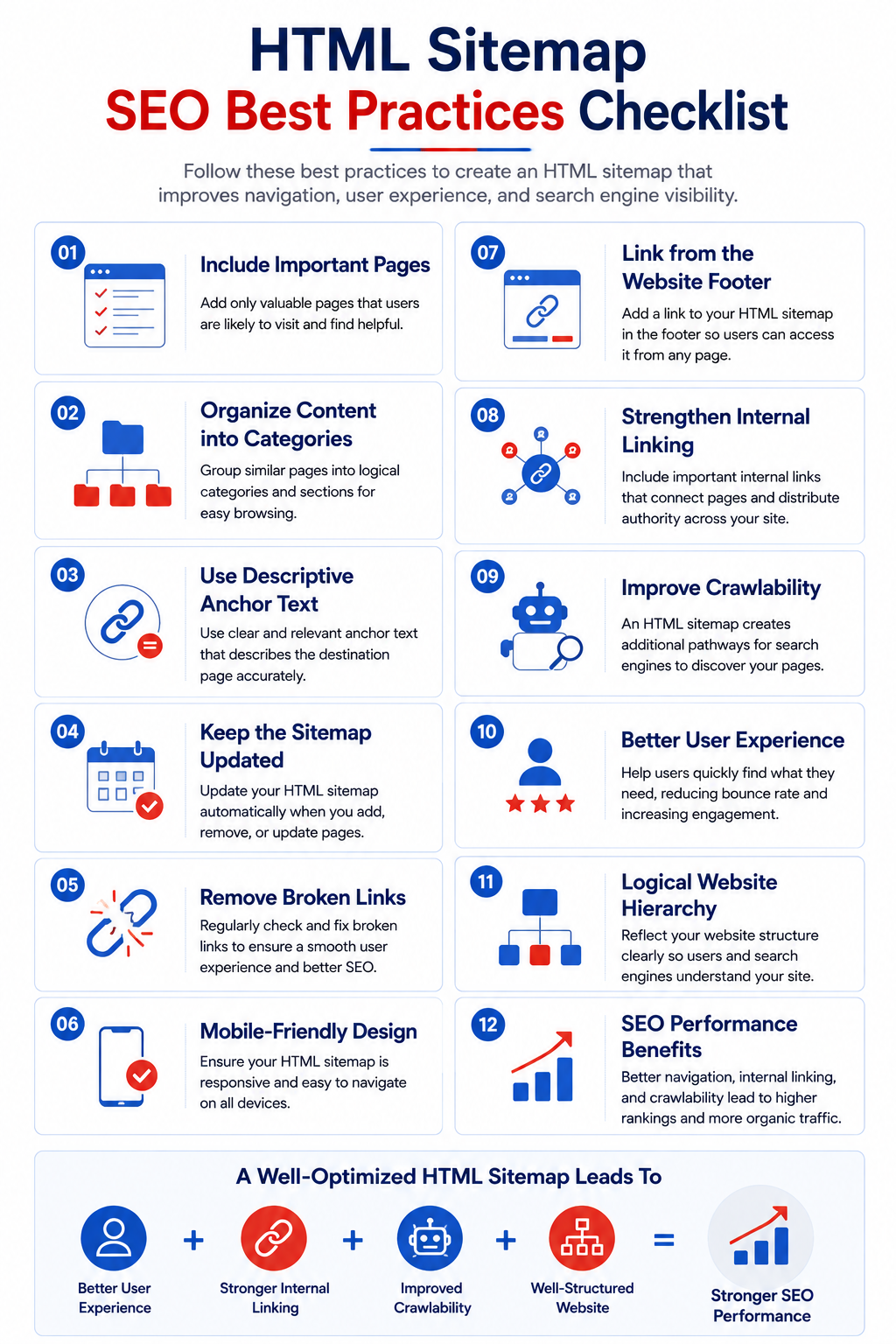
HTML Sitemap Best Practices Checklist
Before publishing or updating your sitemap, use this checklist.
- Include only valuable pages.
- Organize links into logical categories.
- Use descriptive anchor text.
- Reflect your website hierarchy.
- Link from the website footer.
- Remove broken links.
- Update automatically whenever possible.
- Keep navigation simple.
- Ensure mobile responsiveness.
- Support your internal linking strategy.
- Avoid duplicate URLs.
- Review the sitemap during every technical SEO audit.
Conclusion
An HTML sitemap may seem like a simple webpage, but it plays an important role in creating a better user experience and a stronger website structure. While XML sitemaps help search engines discover URLs, HTML sitemaps help visitors navigate your content more efficiently and reinforce your internal linking strategy. For websites with large amounts of content, well-organized HTML sitemaps make it easier to surface valuable pages, improve content discovery, and support a logical site hierarchy. Combined with strong navigation, contextual internal links, clean URL structures, and a thoughtful website architecture, they contribute to a more accessible and SEO-friendly website. As your website grows, review your HTML sitemap regularly to ensure it reflects your current content, supports user journeys, and aligns with your broader technical SEO strategy.
As websites grow, maintaining an effective HTML sitemap becomes increasingly important for supporting navigation, crawlability, and long-term SEO performance. If you're expanding your online presence in competitive search markets, explore our expert seo in uk to learn how our technical SEO specialists build scalable website structures, optimize internal linking, and improve search visibility for businesses across the UK.
Build a Better Website Structure with Expert Technical SEO
From HTML sitemaps and internal linking to crawl optimization and scalable website architecture, our UK SEO specialists help businesses create search engine-friendly websites that rank, grow, and convert.
Explore UK SEO Services