What is Google Business Profile Verification?
Google Business Profile verification is the process of confirming that you are the legitimate owner or manager of a business listing on Google. Once verified, the business becomes visible on Google Search and Google Maps, allowing businesses to manage their information, respond to reviews, and interact with customers.
The days of flipping through bulky phonebooks to find a local business are long gone, thankfully for the trees! Instead, the digital age has brought us tools like the Google Business Profile, which is no longer just a nice-to-have feature but an absolute necessity for businesses wanting to stay relevant and competitive. Here’s why this tool is crucial:
-
Enhanced Customer Engagement: Verified profiles lead to 70% more location visits and 50% more interactions through Google Maps business listing and Search.
-
First Point of Contact: 64% of consumers rely on a business profile on Google to gather information before making purchasing decisions.
-
Boost in Local Visibility: Local businesses benefit greatly, as 46% of all Google searches are seeking local information. Creating and optimizing a Google Business Profile ensures your business is easily discoverable.
A well-maintained Google Business Profile listing not only improves your visibility but also builds trust and credibility with customers. By ensuring accurate and updated information, businesses can encourage customer engagement, whether it’s through a physical visit, a phone call, or an online purchase.
This guide will walk you through:
-
How to claim your Google Business Profile and verify it.
-
Tips for avoiding common pitfalls.
-
Strategies to optimize your profile for maximum engagement.
Whether you want to create Google Business Profile for a small coffee shop or a multi-location franchise, these actionable insights will help you unlock the full potential of your profile.
What is a Google Business Profile?
Google Business Profile (formerly Google My Business) is a free tool that allows businesses to manage how their business appears on Google Search and Google Maps. It displays key business details such as address, phone number, operating hours, photos, services, and customer reviews.
A Google Business Profile is a free asset provided by Google that allows businesses to manage how their information appears in search results and on Google Maps. By creating a profile, businesses can share crucial details like their address, phone number, operating hours, website, photos, and customer reviews. A properly managed Google business account is a key resource for local businesses aiming to connect with potential customers effectively.
Let’s understand how to take control of your local growth with the help of GMB with our step-by-step guide.
Why Your Business Needs a Google Business Profile
Whether you’re running a boutique store, a SEM agency, or a family-owned restaurant, a Google Business Profile is a must-have. Here’s why:
-
Connect with Your Target Audience: Help your ideal customers find you quickly and learn what you offer.
-
Compete Locally: Stand out among local competitors by appearing in Google’s local search results.
-
Build Trust: Display customer reviews and accurate business details to establish credibility.
-
Drive Engagement: Encourage visits, calls, and online orders through easy access to your contact details and services.
Step 1: Setting Up Your Google Business Profile
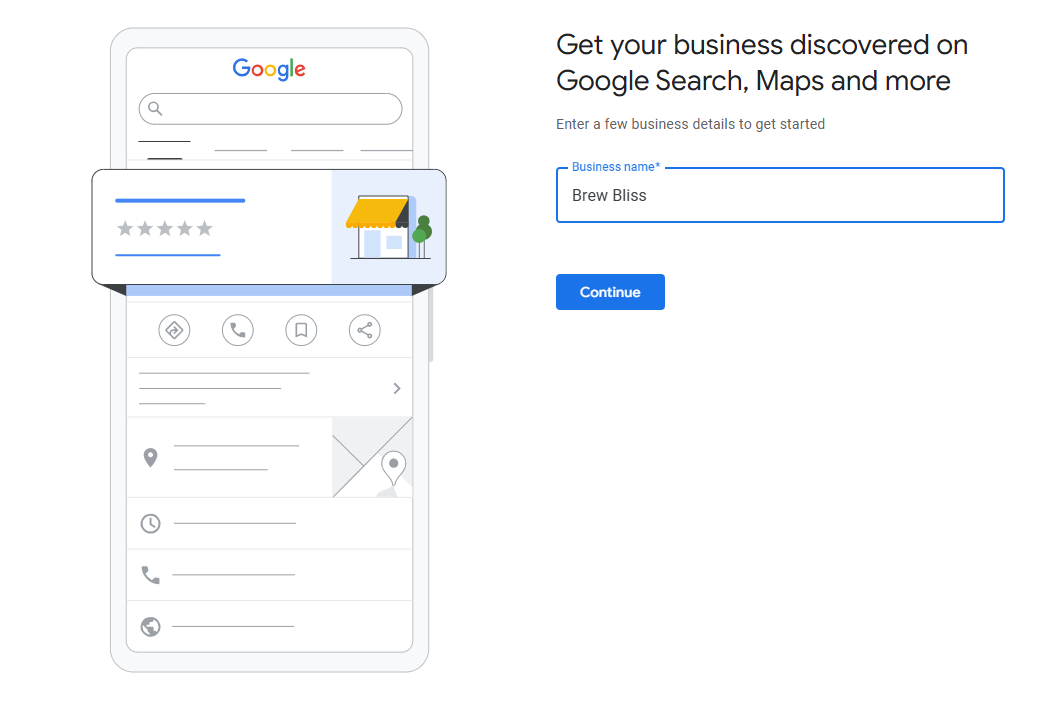
Creating a profile is the first and most important step to improving your online presence. Here’s how to create a Google Business Profile:
Go to Google Business Profile Manager and log in using a Google account.
Add your business name, category, and street address. If operating as a delivery service, you can choose to hide your address and list service areas instead.
Add areas where you offer your services to ensure you reach local customers effectively.
Include your phone number and website URL, making it easy for customers to contact you or place online orders.
Review your details before clicking “Finish” to complete the Google Business Profile setup.
Impact:
Avoid These Mistakes:
-
Using inconsistent business names across platforms.
-
Entering incorrect addresses or contact details.
-
Skipping fields like business hours.
Step 2: Claiming an Existing Google Business Profile
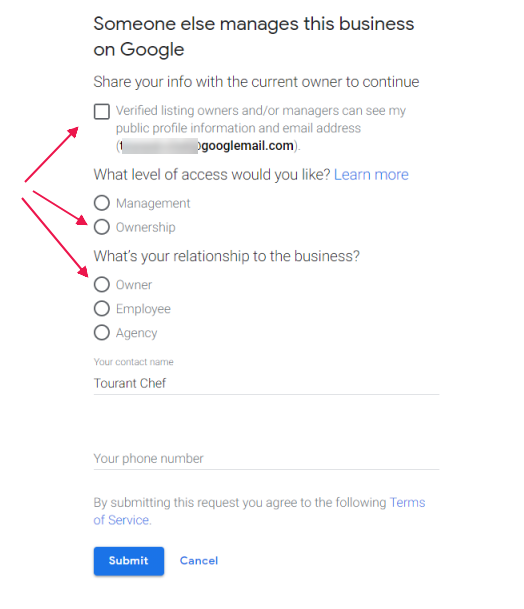
Image Source- Online Ownership
Sometimes, businesses find that their profile already exists, often created by Google or a third party. If this happens, follow these steps to claim your Google Business Profile:
1. Search for the Business on Google
Search for your business name on Google Maps business listing or Search.
2. Request Ownership
Click “Own this business?” and follow the prompts to verify your claim.
3. Approval Process
If another user manages the profile, Google notifies them. Wait for seven days for approval or claim Google business profile directly if no response is received.
4. Impact:
Claiming an existing profile ensures you can manage your business information, respond to reviews, and control your Google business account.
Avoid These Mistakes:
How to Request Ownership of an Existing Google Business Profile
Sometimes a business profile is already verified by another user. In such cases, you must request ownership instead of creating a new listing.
Steps to request ownership:
1. Search for your business on Google
2. Click “Own this business?”
3. Submit an ownership request
4. Wait for the current manager to approve the request
5. If there is no response within seven days, Google may allow you to claim the listing
Once ownership is transferred, you can fully manage your Google Business Profile information.
Step 3: Verifying Your Google Business Profile
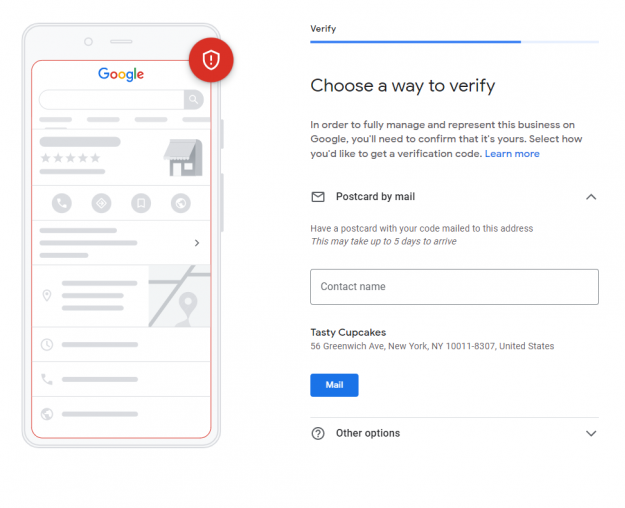
Image Source- BrightLocal
Verification is crucial to make your profile visible to potential customers. Once your business is verified, it becomes eligible to appear in local search results and Google Maps.
Google offers several verification methods depending on your business type, location, and available public information. Not every business will see all verification options during the process.
Below are the most common Google Business Profile verification methods.
1. By Mail (Postcard)
- Google sends a postcard containing a unique verification code to your registered business address.
- Once you receive the postcard, enter the code in Google Business Profile Manager to complete the verification process.
2. By Phone
- Some eligible businesses can verify their profile through a phone call or SMS message.
- Google sends a verification code directly to the registered business phone number, allowing instant verification.
3. By Email
- In certain cases, Google provides email verification.
- A verification link or code is sent to the registered business email address to confirm ownership.
4. Instant Verification
- If your business website is already verified through Google Search Console using the same Google account, your profile may qualify for instant verification.
- This allows you to skip the traditional verification process.
5. Video Verification
- Google may ask you to record a short video that shows proof of business ownership.
- The video typically needs to include your storefront signage, workspace, equipment, or other evidence confirming that your business operates at the listed location.
Impact:
-
Verification ensures your business profile becomes visible in Google Search and Google Maps business listings, significantly location-based SEO services, foot traffic, and customer engagement.
Avoid These Mistakes:
- Missing the postcard deadline or entering incorrect verification codes.
- Using inaccurate business addresses or phone numbers.
- Ignoring eligibility requirements for phone or email verification methods.
Troubleshooting Tips
Didn’t receive the postcard:
- Check your mailbox carefully, as postcards may sometimes be delayed or misplaced.
- If the postcard does not arrive within 12 days, log in to Google Business Profile Manager and request a new verification code.
Address formatting issues:
- Ensure your business address is accurate and follows the standard format used by your local postal service.
- Avoid abbreviations or inconsistent address details such as “Street” vs “St.” that may cause verification errors.
Phone or email verification problems:
-
Ensure the phone number or email linked to your Google business account is active and accessible.
-
Double-check for typos or outdated contact information that might block communication. If the contact info is correct but the mail never arrives, you may need to diagnose sender rejected errors to see if your server is blocking Google's automated SMTP handshake
General issues with verification:
-
Verify that your business category is eligible for phone or email verification.
-
For further assistance, contact Google support to resolve technical or eligibility problems.
-
Taking these proactive steps can help you overcome verification challenges quickly and get your Google Business Profile listing up and running.
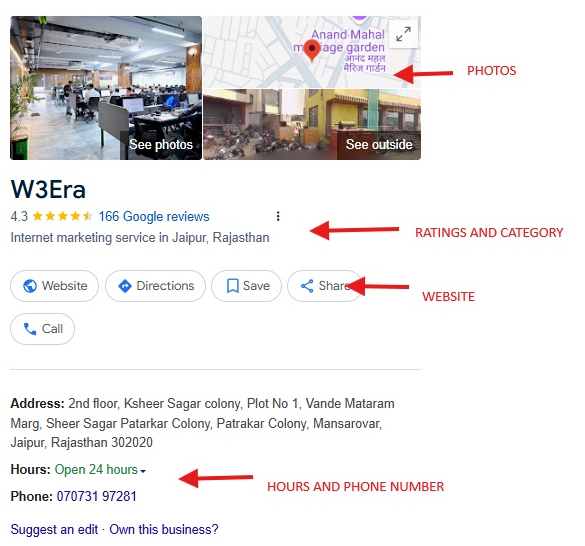
Once verified, focus on optimizing your profile to attract more customers. Here’s what to do:
1. Complete All Business Details
2. Add Photos and Videos
-
Upload pictures of your storefront, products, or services to create a strong visual appeal.
-
Businesses with photos receive 42% more requests for directions than those without.
3. Focus on Relevant Keywords
-
While crafting posts, updates, and responses to reviews, naturally use service-specific and location-based terms (e.g., “Downtown bakery” or “family-owned restaurant”).
4. Enable Messaging
5. Monitor and Respond to Reviews
-
Encourage your customers to leave feedback and engage with their reviews, both positive and negative.
-
Tools like SingleInterface’s Engagement Management can help track and respond to reviews efficiently.
6. Post Updates Regularly
Weekly updates about new products, seasonal offers, or events keep your audience engaged.
Impact:
-
A well-optimized profile increases foot traffic, enhances customer trust, and improves online visibility.
-
Businesses should also maintain accurate listings across trusted industry-specific business directories to strengthen citation consistency, entity validation, and local SEO authority.
Avoid These Mistakes:
Bonus:
| Business Niche |
Sample Description |
Most-Used Keywords |
Optimization Tips |
| Cafes & Coffee Shops |
"Sip, relax, and recharge at [Your Cafe Name]. Located in the heart of [City/Area], we serve locally sourced coffee and pastries." |
Coffee shop near me, local coffee, best cafe in [City] |
Add photos of your drinks, share seasonal menu updates, and encourage customers to leave reviews. |
| Boutiques |
"Discover unique, handcrafted fashion at [Your Boutique Name]. From stylish apparel to accessories, we bring curated collections to [City/Area] shoppers." |
Boutique near me, women’s fashion, handcrafted apparel |
Showcase product photos, highlight sales in posts, and respond promptly to stock inquiries. |
| Digital Marketing Agencies |
"At [Your Agency Name], we specialize in SEO, social media, and PPC campaigns tailored for [City/Area] businesses." |
Digital marketing near me, SEO services, growing online |
Highlight client testimonials, post case studies, and ensure business hours reflect consultation availability. |
| Restaurants |
"Taste the flavors of [Cuisine Type] at [Your Restaurant Name]. Known for fresh ingredients, warm atmosphere, and exceptional service in [City]." |
Best restaurant in [City], family dining, [Cuisine Type] |
Share images of popular dishes, add delivery/reservation links, and promote special menus or events. |
| Gyms & Fitness Centers |
"Achieve your fitness goals at [Your Gym Name]. With expert trainers and state-of-the-art equipment, we help [City/Area] residents stay motivated." |
Fitness center near me, personal training, memberships |
Add photos of gym facilities, promote membership offers, and post updates on new classes or challenges. |
Any business can optimize its Google Business Profile by focusing on customer-focused descriptions, high-quality visuals, responding to reviews, and regular updates tailored to its niche for maximum local visibility and engagement.
Conclusion
A Google Business Profile is more than just a tool for visibility, it’s a powerful way to engage with customers, establish trust, and grow your business. By following the steps outlined in this guide, businesses like Brew Bliss can successfully claim and verify Google Business Profile, ensuring they stand out in local searches and attract more customers.
From setting up your profile to optimizing it with the right keywords and visuals, every step contributes to building a strong online presence. Whether you’re a small business owner or managing multiple locations, leveraging the full potential of a Google Business Profile listing is a must in today’s digital era. Take action today to make your business more discoverable and accessible to your audience.
People Also Read: